Tag: artificial-intelligence

  • Copilot Cowork Is Coming: Here’s How to Get Your Tenant Ready on Day 1

    Copilot Cowork Is Coming: Here’s How to Get Your Tenant Ready on Day 1

    Get Your Tenant Ready for Day 1: Joining Microsoft 365 Frontier for Copilot Cowork

    If you’ve been following the buzz around Copilot Cowork, you already know it’s going to change how we work inside Microsoft 365. But here’s the thing — Day 1 readiness doesn’t happen on Day 1. It happens now.

    In this post, I’ll walk you through exactly how to get your tenant set up: the right licenses, how to join the Frontier program, enabling the Anthropic sub-processor, configuring pilot groups, and locking down governance before you open the floodgates.

    Copilot Cowork is expected to be available for Frontier customers late March or later.


    Step 1: Make Sure You Have the Right Licenses

    Before you can enable anything, your tenant needs the right foundation.

    RequirementDetails
    Microsoft 365 Copilot licenseRequired for all end users who will access Copilot Cowork. Available as an add-on on E3, E5, Business Standard, and Business Premium plans.
    AI Administrator roleRequired to make changes in the Copilot settings area of the Admin Center.
    Microsoft Entra ID P1 or P2Needed for group-based access control and conditional access (P1 minimum).
    SharePoint OnlineIncluded in most M365 plans — required for Cowork’s document grounding.

    Admin tip: Before you go further, run a license audit. In the Microsoft 365 Admin Center, go to Billing > Licenses and confirm Copilot licenses are assigned — unassigned licenses won’t show up in Frontier eligibility checks.


    Step 2: Join Microsoft 365 Frontier

    Microsoft 365 Frontier is the early adopter program that gives your tenant access to upcoming Copilot features before general availability — including Copilot Cowork.

    What you’ll need first

    You must have AI Administrator access to complete this setup. If you don’t have this role, work with your Global Admin to get it assigned before you start.

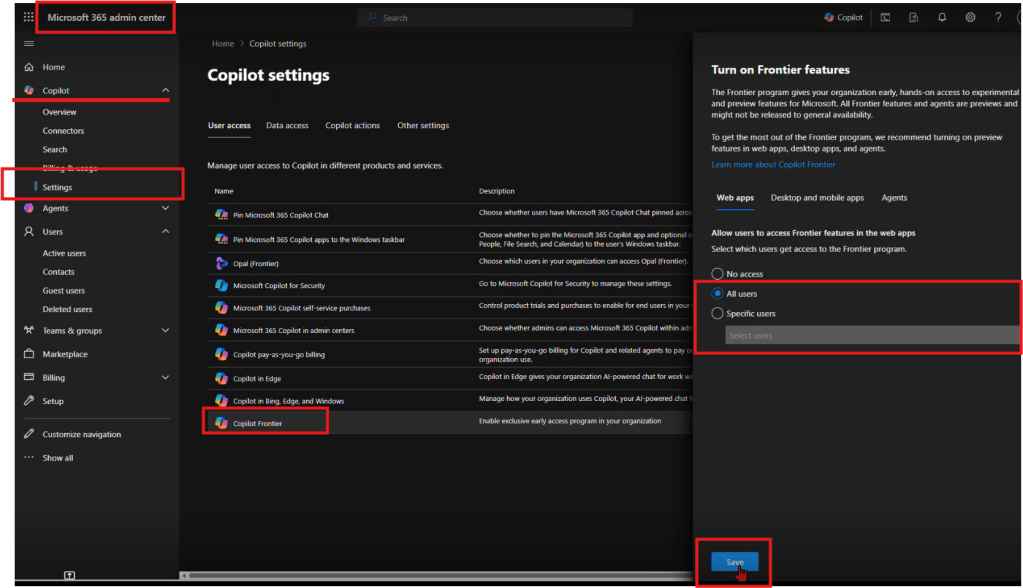
    How to join Frontier

    1. Start from office.com and open the Admin Center.
    2. Navigate to Copilot → Settings → Frontier.
    3. On the Frontier settings page, enable early access.
    4. Under Web Apps, select the users who should be included.
    5. Click Save.

    That’s it — your tenant is now enrolled in Frontier.


    Step 3: Enable Anthropic as an AI Provider

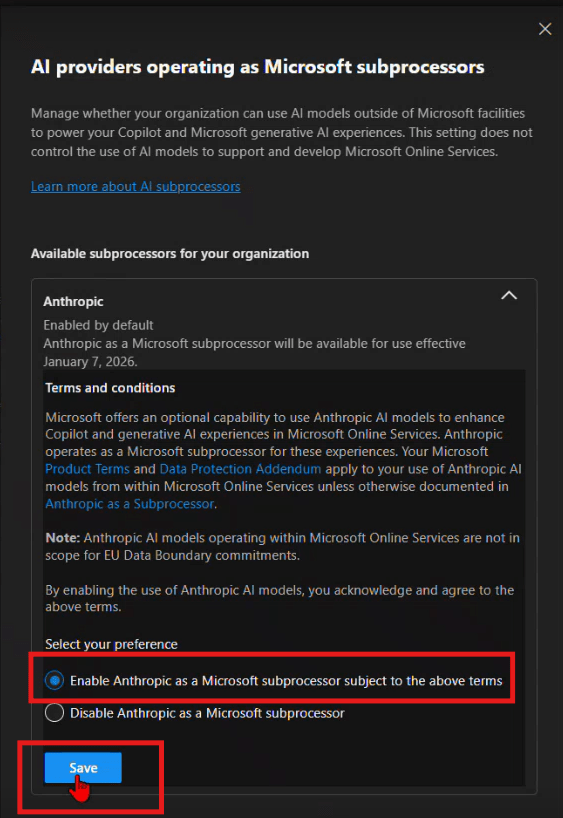
    After Frontier is enabled, you need to turn on the AI providers that power the new Copilot experiences. This is the step most admins don’t realize is required.

    How to enable Anthropic

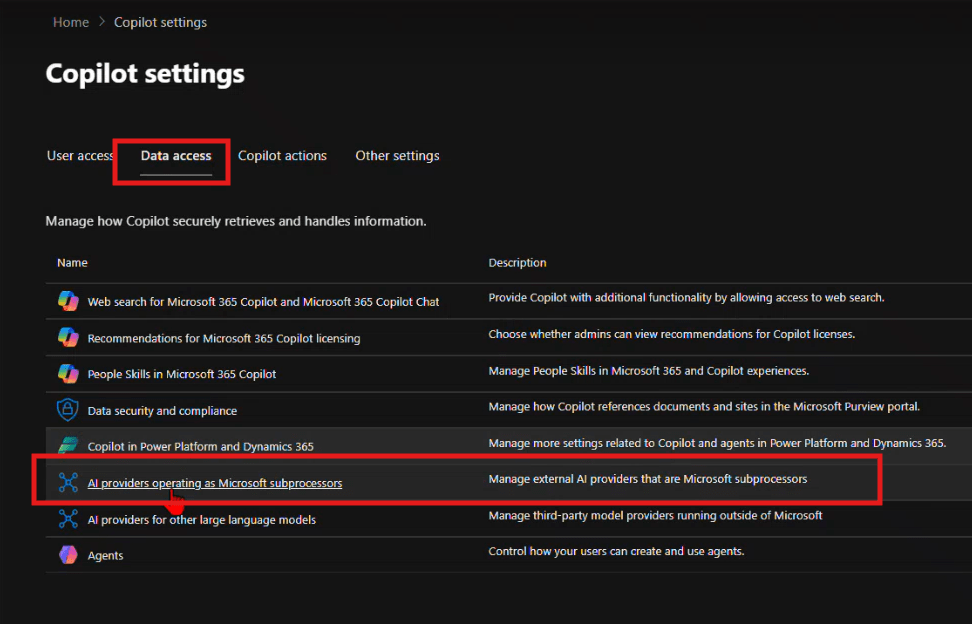
    1. From the same Copilot settings area, navigate to Data access.
    2. Enable the available AI providers — the recommendation is to enable as many as possible.
    3. Specifically, find Anthropic and enable it for Copilot.


    Step 4: Set Up Pilot Groups (Optional)

    Don’t roll Frontier out to your entire organization on Day 1. A phased pilot protects your environment and gives you time to validate the experience before broad deployment.

    Recommended pilot structure

    PhaseGroupPurpose
    Wave 1 — Champions5–10 power users (IT, Copilot champions)Validate setup, surface issues early
    Wave 2 — Early Adopters50–100 users across key departmentsReal-world workflow testing
    Wave 3 — Broad RolloutAll licensed usersFull deployment

    How to configure

    1. Create security groups in Microsoft Entra ID — for example, SG-CopilotCowork-Wave1 and SG-CopilotCowork-Wave2.
    2. In the Frontier settings from Step 2, assign early access to your Wave 1 group first using the Web Apps user selection.
    3. Expand to Wave 2 once Wave 1 has validated the experience.

    Pro tip: Set up a Microsoft Teams channel for your pilot group — something like #cowork-pilot-feedback — so you have a central place to collect issues and wins before you scale.


    Step 5: Governance — Lock Down Oversharing Before You Start

    This is the step most organizations skip — and regret. When Copilot can surface content from across your tenant, oversharing becomes a data exposure risk, not just a governance annoyance. Lock this down before you enable Cowork broadly.

    Key controls to review

    ControlWhere to set itRecommendation
    External sharingSharePoint Admin Center → Policies → SharingSet to “Existing guests only” or “Only people in your org” during Frontier rollout
    Default sharing linksSharePoint Admin Center → Policies → SharingChange from “Anyone with the link” to “People in your organization”
    Site-level permissionsIndividual site settingsAudit “Everyone except external users” — this is the #1 oversharing culprit
    Sensitivity labelsMicrosoft PurviewApply labels to classify and restrict access to confidential content
    Guest access expirationEntra ID → External collaboration settingsSet guest access to expire after 90 days

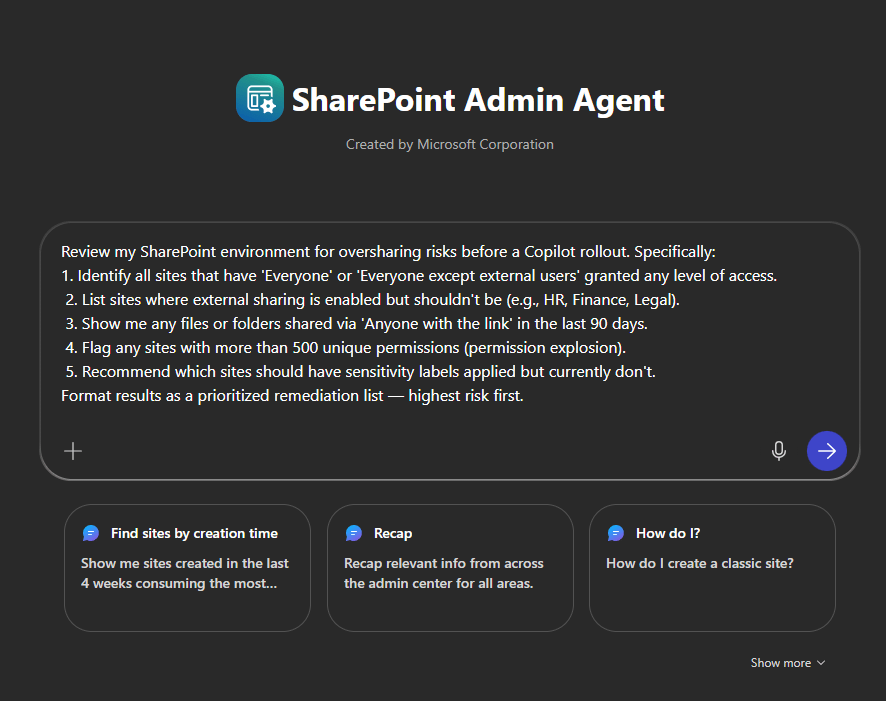
    SharePoint Admin Agent Prompt: Oversharing Audit

    Use this prompt directly with the SharePoint Admin agent in the Microsoft 365 Admin Center to get a fast, prioritized oversharing assessment:

    Review my SharePoint environment for oversharing risks before a Copilot rollout. Specifically:
    1. Identify all sites that have 'Everyone' or 'Everyone except external users' granted any level of access.
     2. List sites where external sharing is enabled but shouldn't be (e.g., HR, Finance, Legal).
     3. Show me any files or folders shared via 'Anyone with the link' in the last 90 days.
     4. Flag any sites with more than 500 unique permissions (permission explosion).
     5. Recommend which sites should have sensitivity labels applied but currently don't.
    Format results as a prioritized remediation list — highest risk first.
    

    This gives you an actionable list to work through before any end user asks Copilot Cowork a question about a document they shouldn’t be able to see.


    Your Day 1 Readiness Checklist

    • [ ] M365 Copilot licenses assigned to target users
    • [ ] AI Administrator role confirmed
    • [ ] Tenant enrolled in Frontier (Copilot → Settings → Frontier)
    • [ ] Early access enabled and Web Apps users selected
    • [ ] Anthropic enabled under Data access → AI providers
    • [ ] Pilot security groups created (Wave 1, 2, 3)
    • [ ] SharePoint oversharing audit completed using Admin agent prompt
    • [ ] External sharing policies tightened
    • [ ] Sensitivity labels deployed for confidential content
    • [ ] Pilot feedback channel set up in Teams

    Final Thought

    Copilot Cowork is a new way of working. The organizations that will get the most out of Day 1 are the ones doing this prep work right now. Join Frontier, enable Anthropic, run your oversharing audit, and start small with a tight pilot group.

    The foundation is simple: Frontier starts with admin enablement and provider access. Once that’s in place, you’re ready for everything that comes next.

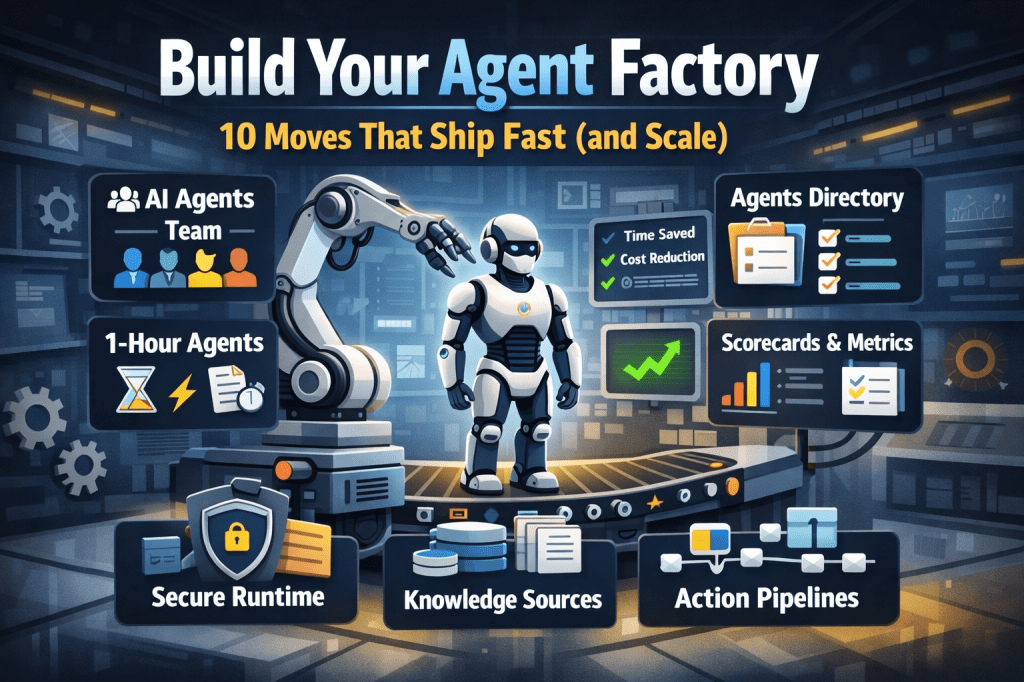
  • Build Your Agent Factory: 10 Moves That Ship Fast (and Scale)

    Build Your Agent Factory: 10 Moves That Ship Fast (and Scale)

    Build Your Agent Factory: 10 Moves That Ship Fast (and Scale)

    Agents at scale. Not POCs.

    Here’s the playbook I’d hand any exec or builder who wants working agents in production—without turning the org into a science fair.

    1) Stand up an AI Agents Workforce

    What it is: A small cross-functional crew with authority to hunt repetitive work and ship agents.

    Who’s in:

    • 1 product owner
    • 1 engineer (Copilot Studio/Power Automate)
    • 1 data person
    • 1 security/governance lead
    • 1 domain SME.

    Ship this week: Write a one-page charter with scope, decision rights, and a 30-day roadmap (first 5 agents + metrics).

    2) Win with horizontals first, then go vertical

    Horizontals (1-hour wins): drafting, summarizing, policy Q&A, meeting notes to actions, form-fill helpers.

    Verticals (outsized ROI): pick 1–2 per business unit where there’s money, risk, or SLA pain.

    Guardrail: don’t start with the hardest workflow; start where you can close the loop and measure value inside two weeks.

    3) Make an Agents Directory the front door

    Why: Ideas die in email. A directory turns “we should build X” into spec and governance.

    Minimum intake fields:

    • use case name
    • goal
    • users
    • decision rights
    • data sources + who owns it
    • tools
    • PII/sensitivity
    • KPIs
    • business owner
    • risk level
    • rollout plan.

    Outcome: Every request auto-generates a lightweight PRD (goal, inputs, outputs, metrics, guardrails) and a yes/no gate.

    4) Create the 1-Hour Agent template

    Template anatomy:

    Goal + success criteria Input schema (what the user provides) Tools (actions/connectors) and permissions Knowledge sources (files, sites, indexes) Safety rules (allowed/blocked actions, escalation) Evaluation set (10–20 test prompts with expected outcomes) Deploy script (Dev → Test → Prod)

    Rule: If a use case can’t fit this page, it’s not a 1-hour agent—park it for later.

    5) Tie every agent to a visible scorecard

    Metrics to publish: time saved, cost avoided, error rate, CO₂/efficiency (where relevant), user satisfaction.

    Simple formula: monthly users × average minutes saved × loaded cost = value.

    Make it public internally: green/red status, owner, last review, next improvement.

    6) Run on a secure, managed agent runtime

    Non-negotiables: identity passthrough, content safety, audit logs, tool call restrictions, data boundary controls, environment isolation.

    Practical tip: standardize a “sensitive sources” policy and block tools by default; allow case-by-case.

    7) Split the stack to move fast without breaking things

    Experience layer: Copilot Studio for UX, channels, and connectors.

    Agent runtime/orchestration: managed agent service for threads, tool calls, safety, and evaluations.

    Why it works: builders ship quickly at the edge; platform team keeps shared guardrails, monitoring, and upgrades stable.

    8) Mix knowledge + action (or you’ll stall)

    Knowledge: structured grounding (SharePoint/Fabric/Search), doc versioning, citations-on by default.

    Action: flows/Logic Apps, Graph, line-of-business APIs; always ship with a dry-run mode first.

    Design pattern: Answer → show sources → propose actions → execute on approval. When confidence is high and stakes are low, allow auto-execute.

    9) Keep humans in the loop—by design

    HITL patterns that work:

    Shadow mode (observe only) → suggest mode → execute with approval → auto-execute.

    Confidence thresholds where low confidence routes to a human. Escalation logic when guardrails trip or data is missing.

    UX rule: one click to approve, one click to undo.

    10) Plan to scale on day one

    Pipelines: Dev → Test → Prod with approvals and rollback.

    Evals: pre-ship test set per agent; weekly drift checks; quarterly red-team.

    Ops: central logging, cost dashboards, incident playbook.

    Program ritual: a quarterly “Agent Backlog Day” to harvest new ideas and retire underperformers.

    Starter Architecture (fast and boring)

    Experience: Copilot Studio (web, Teams, M365, chat, plugins)

    Actions: Power Automate/Logic Apps + custom APIs

    Knowledge: SharePoint/Fabric/AI Search with retrieval policies

    Runtime: managed agent service for tool orchestration, identity, safety

    Observability: evaluations, telemetry, and a simple agent scorecard per app

    Security: Entra ID RBAC, private endpoints, DLP, approval gates

    Prompts and policies that save you pain

    Prompt contract (keep it in the repo): role, goals, inputs, allowed tools, forbidden actions, decision rights, escalation, output format, citation rules.

    Data contract: what sources are permitted, freshness expectations, sensitivity tags.

    Failure modes: what the agent must do when unsure (ask for clarification, route to human, or stop).

    Anti-patterns I keep seeing

    • Starting with an “AI strategy deck” instead of shipping 3 agents.
    • Agents that answer but can’t act—users stop coming back.
    • No owner, no scorecard, no sunset date.
    • Canary-testing in production without a rollback plan.
    • Letting one giant use case block 20 small wins.

    Your first week mapped

    Day 1: Form the team and publish the charter.

    Day 2: Launch the Agents Directory (intake + PRD autogeneration).

    Day 3–4: Build two 1-hour agents (drafting + policy Q&A) with eval sets.

    Day 5: Ship to a pilot group with scorecards visible. Book the first backlog day.


  • Maximize Efficiency with GPT-5 Router-Optimized Prompts

    Maximize Efficiency with GPT-5 Router-Optimized Prompts

    This prompt pack is around general use, if you would like a more focused pack focused on a specific industry or scenario, comment below.

    Below you will find the prompt pack in 3 formats

    Word doc download:

    Markdown download (word press wont let me upload markdown file so I have uploaded to my GitHub for download: FlowAltDelete/GPT-5-Router-Optimized-Universal-Prompt-Pack

    If you don’t want to download, I have also put the prompt pack below

    GPT‑5 Router‑Optimized Universal Prompt Pack (v1.1)

    What this is: A field‑tested, router‑aware prompt pack tuned for GPT‑5.
    How to use: Paste the Router Boost Header 2.0 above any task below, then use the upgraded prompt. Each item includes a fast audit (strengths, gaps, tuning) so you know why it works.


    Router Boost Header 2.0 (paste above any prompt)

    Task: [one sentence describing “done”].
    Context/Grounding: [paste facts/links/notes]. Cite sources if summarizing; don’t invent.
    Constraints: audience=[…], tone=[…], length=[…], locality=[region/laws], non‑negotiables=[…].
    Output Contract: [exact format/schema; if JSON, include a schema].
    Tool Grants: You may use internal reasoning, code execution, and structured output. Do not expose chain‑of‑thought; return only the final results.
    Mode: Choose fast for simple tasks, deep for complex ones; state the choice on one line before the output.
    Self‑Check: Validate constraints, factuality (vs. sources), and format before returning. If JSON, ensure it parses.
    Failure Policy: If blocked or context is thin, list missing info and ask 3 sharp questions; otherwise proceed with explicit assumptions labeled “Assumptions.”

    Tip: Keep the header short in production—only include fields that matter. If you need determinism, ask for “low‑randomness; no lateral riffs.”


    Universal GPT‑5 Prompt Pack v1.1**

    Below: for each prompt

    • Use when: best fit.
    • Strengths: what’s good already.
    • Gaps: what to tighten for GPT‑5.
    • Router tuning: small switches that improve results.
    • Upgraded prompt: copy/paste ready.
    • (Optional) Strict JSON variant: when you need machine‑readable output.

    1) Executive Summary (Any Topic)

    Use when: You need crisp, executive‑level clarity in 30–90 seconds.
    Strengths: Forces prioritization; covers timing and action.
    Gaps: Can drift into fluff; doesn’t enforce one‑line bullets; missing “evidence”.
    Router tuning: Demand one‑line bullets with bold labels; add “evidence” blip; enforce count.

    Upgraded prompt

    Create exactly **5 one‑line bullets** summarizing [topic/brief].
    Each bullet starts with a bold label: **What matters**, **Why now**, **Risks**, **Decision**, **Next actions**.
    Add ≤12 words per bullet. Include 1 source or metric if available.
    Mode: [fast/deep]. Return as a simple bullet list—no preamble.
    

    Strict JSON variant

    Return valid JSON:
    { "what_matters": "...", "why_now": "...", "risks": "...", "decision": "...", "next_actions": "..." }
    

    2) Research Plan (Adversarial)

    Use when: You must test a claim/feature beyond happy‑path.
    Strengths: Calls for metrics, data, adversarial tests.
    Gaps: No threat model; no instrument plan; no stop/continue math.
    Router tuning: Introduce threat model + falsification criteria; add power checks.

    Upgraded prompt

    Design an **adversarial research plan** to evaluate [claim/feature]. Include:
    1) Objectives & hypotheses (null + alt); 2) Success metrics & thresholds; 3) Threat model (abuse, edge cases);
    4) Data to collect (fields, sample size/power);
    5) Protocols (A/B, holdout, offline evals);
    6) Adversarial tests & red‑team scripts;
    7) Stop/continue rule with math;
    8) Reporting template (tables/plots).
    Mode: [fast/deep]. Output as a numbered outline.
    

    3) Decision Memo

    Use when: A one‑pager to choose among options.
    Strengths: Options, costs, risks, reversibility, rec.
    Gaps: No owner/date format; no “evidence” box; weak contingency.
    Router tuning: Add RACI owner/date; add 30/60/90 follow‑ups.

    Upgraded prompt

    Write a one‑page decision memo for [choice]. Include:
    - Context (1 para) with constraints & evidence;
    - Options (3): summary, costs (one‑time/run), risks, reversibility;
    - Recommendation: **one** choice with rationale;
    - Owner + Decision date; 30/60/90‑day checkpoints;
    - Contingency triggers & rollback plan.
    Mode: [fast/deep]. Keep ≤400 words.
    

    4) Project Plan One‑Pager

    Use when: Turn messy notes into plan.
    Strengths: Scope, milestones, owners, risks, comms, RAID.
    Gaps: No critical path; RAID often hand‑wavy.
    Router tuning: Add dates & simple Gantt list; RAID as compact table.

    Upgraded prompt

    From these notes: [paste], produce a one‑page plan with:
    1) Scope (in/out);
    2) Milestones (name, owner, date) in order;
    3) Critical path (1‑3 bullets);
    4) Comms cadence (who, channel, freq);
    5) RAID summary table (Risk/Assumption/Issue/Dependency → owner, impact, mitigation);
    6) Acceptance criteria (bullet list).
    Mode: [fast/deep]. Keep it skimmable.
    

    5) Meeting → Decisions

    Use when: Converting raw notes to what matters.
    Strengths: Decisions & actions separation.
    Gaps: No owners on decisions; action status taxonomy missing.
    Router tuning: Add decision owner + rationale; status enum.

    Upgraded prompt

    Convert these notes: [paste] into:
    A) **Decisions** list (decision, owner, rationale, date);
    B) **Actions** table {owner, step, due, status ∈ [New, In‑Progress, Blocked, Done]}.
    Mode: [fast/deep]. No commentary, just the two sections.
    

    Strict JSON variant

    { "decisions": [ { "decision": "", "owner": "", "rationale": "", "date": "" } ],
      "actions": [ { "owner": "", "step": "", "due": "", "status": "New|In-Progress|Blocked|Done" } ] }
    

    6) Cold Email Trio

    Use when: 3‑touch outbound sequence.
    Strengths: Problem → proof → ask. Short.
    Gaps: ICP nuance; weak personalization; missing CTA micro‑asks.
    Router tuning: Insert first‑line personal hook; vary asks.

    Upgraded prompt

    Write **3 cold emails** for [offer] to [ICP].
    Email 1: name the **patterned pain**; end with a 10‑min micro‑ask.
    Email 2: social proof/insight (number/metric), 1 sentence case study.
    Email 3: crisp ask with 2 time options.
    Each ≤120 words, 5‑7 sentences, no fluff. Include a {First‑line personalization} placeholder.
    Mode: [fast/deep].
    

    7) LinkedIn Authority Post

    Use when: Thought leadership for execs + builders.
    Strengths: Structure, framework, prompt.
    Gaps: Risk of buzzwords; no proof.
    Router tuning: Require 1 mini‑case and 1 number.

    Upgraded prompt

    Write a LinkedIn post on [topic] for execs + builders:
    - 3 punchy paragraphs (≤60 words each);
    - 1 mini‑framework (3 bullets, named);
    - 1 thought prompt (1 line);
    - Include one concrete number or example; avoid buzzwords.
    Mode: [fast/deep]. No hashtags unless asked.
    

    8) X Post (Bold, No Hashtags)

    Use when: High‑signal micro‑take.
    Strengths: Tight character limit, bold stance.
    Gaps: Might overrun chars; no proof token.
    Router tuning: Enforce count; include 1 fact word/number.

    Upgraded prompt

    Write one confident X post on [insight/news]. ≤240 chars.
    Format: HOOK — TAKEAWAY. Include **one** concrete fact or number.
    No hashtags. No emoji at the end. Mode: [fast/deep].
    

    9) YouTube Kit

    Use when: Fast ideation + structure.
    Strengths: Titles, open, chapters.
    Gaps: Title length drift; missing viewer promise.
    Router tuning: Enforce title count/length; add “who it’s for.”

    Upgraded prompt

    For a video on [topic], produce:
    - **10 titles** (<60 chars);
    - A two‑sentence cold open that states who it’s for and the promise;
    - Chapter list with timestamps (estimate) and outcomes per chapter.
    Mode: [fast/deep]. No clickbait lies.
    

    10) Content Angle Generator

    Use when: Topic expansion without repetition.
    Strengths: Rich buckets.
    Gaps: Duplicates; vague angles.
    Router tuning: Enforce uniqueness + sample headline.

    Upgraded prompt

    List **25 distinct content angles** for [niche/product] across:
    how‑to, contrarian, teardown, story, data, tutorial, tool, myth vs fact.
    For each: 1‑line angle + a sample headline. No repeats. Mode: [fast/deep].
    

    11) Product Spec from Idea

    Use when: Move from idea to v1.
    Strengths: Users, JTBD, metrics, scope.
    Gaps: Test plan vague; acceptance criteria missing.
    Router tuning: Add measurable acceptance + de‑scoping rules.

    Upgraded prompt

    Turn this idea into a lean product spec:
    - Users & JTBD; key use cases;
    - Success metrics (leading/lagging) with targets;
    - V1 scope (must/should/could) and out‑of‑scope;
    - Acceptance criteria (measurable);
    - Test plan (happy path, edge, abuse).
    Mode: [fast/deep]. ≤500 words.
    

    12) UX Critique

    Use when: Actionable UI improvements.
    Strengths: Issues + fixes.
    Gaps: Evidence often light; microcopy not tested.
    Router tuning: Severity scale + before/after microcopy.

    Upgraded prompt

    Critique the UX of [flow/screen]. Deliver:
    - 10 issues with severity ∈ {P0, P1, P2}, evidence, and concrete fix;
    - A before→after microcopy table (3–5 rows);
    - One quick win and one deeper redesign note.
    Mode: [fast/deep].
    

    13) CSV Data Brief

    Use when: Shape an analysis plan before coding.
    Strengths: Questions → steps → visuals.
    Gaps: Schema ambiguity; data checks missing.
    Router tuning: Add sanity checks + exact chart types.

    Upgraded prompt

    Given CSV schema: [columns], produce:
    1) 5 decision‑driven questions;
    2) Validation checks (types, nulls, outliers);
    3) Analysis steps;
    4) Exact visuals/tables to produce (chart type, axes, groupings).
    Mode: [fast/deep]. No code unless asked.
    

    14) Code from Spec

    Use when: From spec to runnable core.
    Strengths: Architecture, snippets, tests, edges.
    Gaps: Env assumptions; complexity unbounded.
    Router tuning: Pin language/runtime; include complexity notes.

    Upgraded prompt

    Given this spec: [paste], provide:
    - Architecture diagram (text) and key components;
    - Core code snippets in [language/runtime] with minimal deps;
    - Tests (unit/integration) and fixtures;
    - Failure/edge cases + graceful handling;
    - Complexity & trade‑offs section.
    Mode: [fast/deep]. Keep idiomatic.
    

    15) Code Review + Refactor

    Use when: Improve safety & clarity with a plan.
    Strengths: Smells, hotspots, steps, tests.
    Gaps: Lacks risk scoring; migration path unclear.
    Router tuning: Add impact x effort; phased plan.

    Upgraded prompt

    Review this code: [paste]. Deliver:
    - Findings by category (correctness, security, perf, clarity);
    - Hotspots with complexity signals;
    - Refactor plan in small, safe steps with tests;
    - Risk/Impact vs Effort matrix (P0/P1/P2);
    - Before/after snippet for 1 key function.
    Mode: [fast/deep].
    

    16) Strict JSON Every Time

    Use when: Machine‑readable output required.
    Strengths: Clear schema.
    Gaps: No parser check; no enum constraints.
    Router tuning: Include enums & validation note.

    Upgraded prompt

    Return **only valid JSON** for [task]. Schema:
    {
      "title": "string",
      "summary": "string",
      "risks": ["string"],
      "actions": [ { "owner": "string", "step": "string", "eta": "YYYY-MM-DD" } ],
      "metrics": ["string"]
    }
    No prose. Validate keys, types, and date format before returning.
    

    17) SOP / Checklist

    Use when: Repeatable, low‑variance execution.
    Strengths: Steps + gates + recovery.
    Gaps: Timing windows; roles not explicit.
    Router tuning: Add roles & time boxes.

    Upgraded prompt

    Draft a step‑by‑step SOP for [process]. Include:
    - Prereqs & roles;
    - Steps with time boxes;
    - Quality gates with pass/fail checks;
    - Common failure recovery & escalation ladder.
    Mode: [fast/deep]. Output as a checklist.
    

    18) Positioning & ICP

    Use when: Sharpen message‑market fit.
    Strengths: ICP, pains, alts, value prop, messages, pitch.
    Gaps: Jobs vs pains; proof tokens missing.
    Router tuning: Add JTBD & proof lines.

    Upgraded prompt

    Define positioning for [product]. Provide:
    - ICP traits (firmographic + behavioral);
    - JTBD and top pains (ranked);
    - Alternatives (do‑nothing included);
    - Value proposition (benefit + proof);
    - 3 key messages;
    - 3‑line elevator pitch.
    Mode: [fast/deep].
    

    19) Competitive Teardown

    Use when: Side‑by‑side clarity.
    Strengths: Features, UX, pricing, moat, switching costs, objections.
    Gaps: Buyer role nuance; evidence weak.
    Router tuning: Add role lens + cite artifacts.

    Upgraded prompt

    Compare [your product] vs [competitor] for [buyer role]. Cover:
    - Features & UX (table);
    - Pricing (typical deal sizes/TCO);
    - Moat & switching costs;
    - Buyer objections + crisp replies;
    - Evidence links (docs, screenshots) if available.
    Mode: [fast/deep].
    

    20) Policy First Draft (Non‑Legal)

    Use when: First pass policy with clarity.
    Strengths: Rules, examples, do/don’t, escalation.
    Gaps: No scope/authority; review cadence missing.
    Router tuning: Add scope, owner, review cadence.

    Upgraded prompt

    Draft a **non‑legal** first‑pass policy for [topic]. Include:
    - Scope & definitions; policy owner;
    - Rules with examples; do/don’t lists;
    - Compliance checks & escalation path;
    - Exceptions process;
    - Review cadence and change log placeholder;
    - Legal review placeholder.
    Mode: [fast/deep].
    

    21) 7‑Day Learning Plan

    Use when: Focused upskilling in a week.
    Strengths: Daily objectives, resources, practice, quiz.
    Gaps: Entry level varies; no capstone.
    Router tuning: Add diagnostic + capstone.

    Upgraded prompt

    Build a 7‑day learning plan for [skill/exam]. Include:
    - Day 0 diagnostic (what to skip/focus);
    - Daily objectives, resources (≤3/day), and practice tasks;
    - Daily self‑quiz (5 Qs) with expected answers;
    - Day 7 capstone task with rubric.
    Mode: [fast/deep].
    

    22) Negotiation Prep

    Use when: Plan the conversation before the room.
    Strengths: Goals, walk‑away, BATNA, concessions, questions, opening.
    Gaps: Counter‑plays; objection map missing.
    Router tuning: Add opponent map + scripts.

    Upgraded prompt

    Create a negotiation brief for [deal]. Include:
    - Goals; walk‑away; BATNA;
    - Concession strategy (give/get);
    - Questions to surface interests;
    - Opening script;
    - Objection map with counters;
    - Opponent/alignment map (roles, power, interests).
    Mode: [fast/deep].
    

    23) Landing Page Copy

    Use when: Write conversion‑first copy.
    Strengths: Section list, direct tone.
    Gaps: Segment nuance; FAQ weak.
    Router tuning: Add segment option + proof elements.

    Upgraded prompt

    Write a landing page for [offer]. Sections:
    - Headline + subhead (clear promise);
    - Value bullets (3–6) with outcomes;
    - Proof (logos, testimonial lines, metrics);
    - CTA (primary + secondary);
    - FAQ (5–7 Qs).
    Optional: provide a variant for [segment].
    Mode: [fast/deep].
    

    24) Automation Blueprint

    Use when: Design automations with ROI.
    Strengths: Triggers, steps, data, errors, alerts, ROI.
    Gaps: SLAs; run‑costs; auditability.
    Router tuning: Add SLAs, idempotency, and cost model.

    Upgraded prompt

    Propose automations for [workflow]. Include:
    - Triggers & prerequisites;
    - Steps with systems & data sources;
    - Error handling (retries, dead‑letter, idempotency);
    - Alerts/observability (what, who, channel, thresholds);
    - SLAs & run‑cost model;
    - ROI estimate (baseline vs future, payback).
    Mode: [fast/deep].
    

    Bonus: Mini Switches You Can Add Anywhere

    • “Low‑randomness, no lateral riffs.” For deterministic outputs.
    • “Use a verification pass: compare output vs. constraints, fix before returning.”
    • “If citing, append a short sources list with titles + links.”
    • “Label assumptions explicitly if context is thin.”
    • “Return a ‘How to use this output’ note in one line.”

    Final Notes

    • Keep the Router Header lean; the power comes from clear Output Contracts and tight constraints.
    • Prefer JSON when downstream automation is needed; prefer skimmable bullets when humans are the primary consumer.
    • If you need extra toughness, combine “adversarial” and “self‑check” lines.

    Changelog v1.1 (this doc): Added threat models, self‑check, enum statuses, strict JSON variants, SLAs/costs for automation, and decision‑date/owner fields for memos.
  • Add the Microsoft Learn Docs MCP Server in Copilot Studio

    Add the Microsoft Learn Docs MCP Server in Copilot Studio

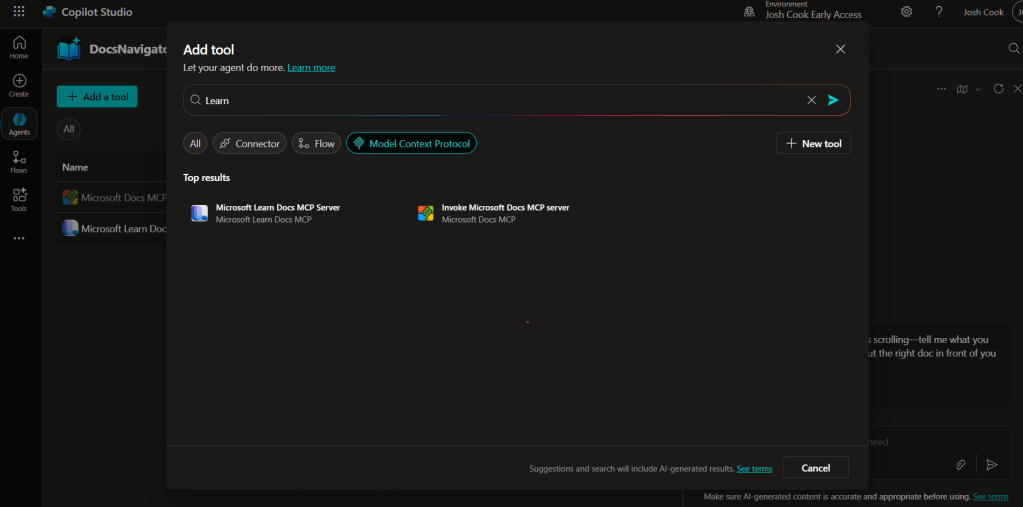
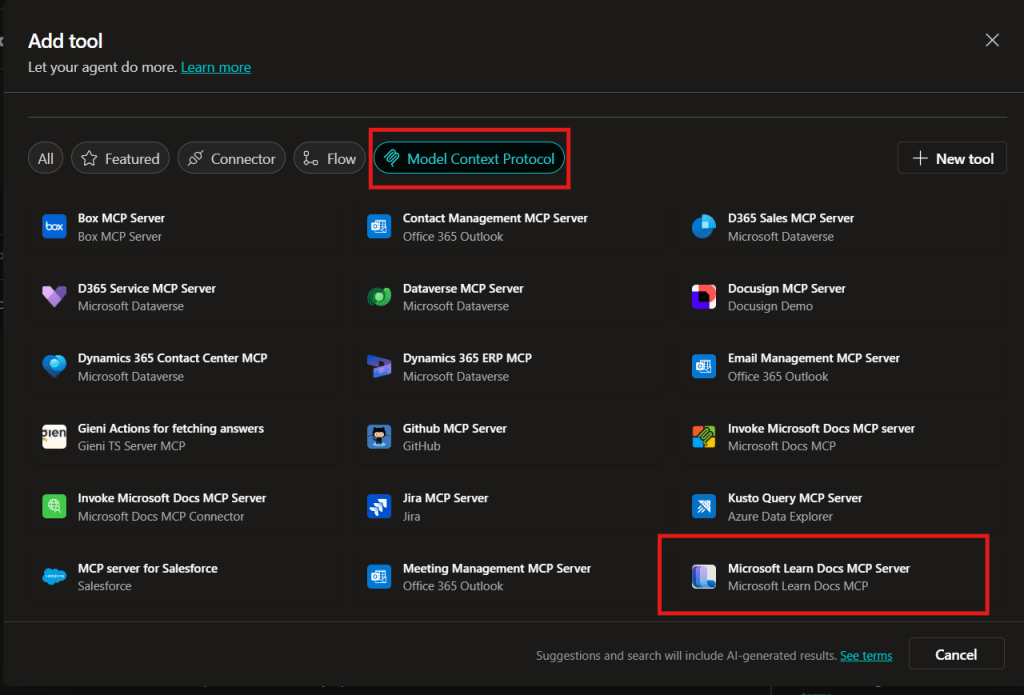
    UPDATE—August 8, 2025: You no longer need to create a custom connector for the Microsoft Learn Docs MCP server. Copilot Studio now includes a native Microsoft Learn Docs MCP Server under Add tool → Model Context Protocol.
    This guide has been updated to show the first-party path. If your tenant doesn’t yet show the native tile, use the Legacy approach at the bottom.

    What changed

    • No YAML or custom connector required
    • Fewer steps, faster setup

    Model Context Protocol (MCP) is the universal “USB-C” port for AI agents. It standardizes how a model discovers tools, streams data, and fires off actions—no bespoke SDKs, no brittle scraping. Add an MCP server and your agent instantly inherits whatever resources, tools, and prompts that server exposes, auto-updating as the backend evolves.

    1. Why you should care
    2. What the Microsoft Learn Docs MCP Server delivers
    3. Prerequisites
    4. Step 1 – Add the native Microsoft Learn Docs MCP Server
    5. Step 2 – Validate
    6. Legacy approach (if the native tile isn’t available)

    Why you should care

    • Zero-integration overhead – connect in a click inside Copilot Studio or VS Code; the protocol handles tool discovery and auth.
    • Future-proof – the spec just hit GA and already ships in Microsoft, GitHub, and open-source stacks.
    • Hallucination killer – answers are grounded in authoritative servers rather than fuzzy internet guesses.

    What the Microsoft Learn Docs MCP Server delivers

    • Tools: microsoft_docs_search – fire a plain-English query and stream back markdown-ready excerpts, links, and code snippets from official docs.
    • Always current – pulls live content from Learn, so your agent cites the newest releases and preview APIs automatically.
    • First-party & fast — add it in seconds from the Model Context Protocol gallery; no OpenAPI import needed.

    Bottom line: MCP turns documentation (or any backend) into a first-class superpower for your agents—and the Learn Docs server is the showcase. Connect once, answer everything.

    Prerequisites

    • Copilot Studio environment with Generative Orchestration (might need early features on)
    • Environment-maker rights
    • Outbound HTTPS to learn.microsoft.com/api/mcp

    Step 1 – Add the native Microsoft Learn Docs MCP Server

    1. Go to Copilot Studio: https://copilotstudio.microsoft.com/
    2. Go to Tools → Add tool.
    3. Select the Model Context Protocol pill.
    4. Click Microsoft Learn Docs MCP Server.
    5. Choose the connection (usually automatic) and click Add to agent.
    6. Confirm the connection status is Connected.
    Copilot Studio Add tool panel showing Model Context Protocol category and Microsoft Learn Docs MCP Server tile highlighted.
    1. The MCP server should now show up in Tools.
    1. Click the Server to verify the tool(s) and to make sure:
      – ✅ Allow agent to decide dynamically when to use this tool
      – Ask the end user before running = No
      – Credentials to use = End user credentials

    Step 2 – Validate

    1. In the Test your agent pane. Turn on Activity map by clicking the wavy map icon:

    2. Now try a prompt like:
      What MS certs should I look at for Power Platform?
      How can I extend the Power Platform CoE Starter Kit?
      What modern controls in Power Apps are GA and which are still in preview? Format as a table

    Use-Case Ideas

    • Internal help-desk bot that cites docs.
    • Learning-path recommender (your pipeline example).
    • Governance bot that checks best-practice-links.

    Troubleshooting Cheat-Sheet

    • Note that currently the Learn Docs MCP server does NOT require authentication. This will most likely change in the future.
    • If Model Context Protocol is not shown in your Tools for Copilot Studio. You may need to create an environment with Early Features turned on.
    • Do NOT reference the MCP server in the agents instructions, you will get a tool error.
    • Check Activity tab for monitoring

    Legacy approach (if the native tile isn’t available)

    Grab the Minimal YAML

    1. Open your favorite code editor or notepad. Copy and paste this YAML to a new file.
    swagger: '2.0'
    info:
      title: Microsoft Docs MCP
      description: Streams Microsoft official documentation to AI agents via Model Context Protocol
      version: 1.0.0
    host: learn.microsoft.com
    basePath: /api
    schemes:
      - https
    paths:
      /mcp:
        post:
          summary: Invoke Microsoft Docs MCP server
          x-ms-agentic-protocol: mcp-streamable-1.0
          operationId: InvokeDocsMcp
          consumes:
            - application/json
          produces:
            - application/json
          responses:
            '200':
              description: Success
    
    1. Save the file with .yaml extension.

    Import a Custom Connector

    Next we need to create a custom connector for the MCP server to connect to. We will do this by importing our yaml file we created in Step 1.

    1. Go to make.powerapps.com > Custom connectors > + New custom connector > Import OpenAPI.

    2. Upload your yaml file eg: ms-docs‑mcp.yaml, using the Import an OpenAPI file option.

    3. General tab: Confirm Host and Base URL.
      Host: learn.microsoft.com
      Base URL: /api
    4. Security tab > No authentication (the Docs MCP server is anonymously readable today).
    5. Definition tab > verify one action named InvokeDocsMcp is present.
      Also add a description.

    6. Click Create connector. Once the connector is created, click the Test tab, and click +New Connection.

      (Note, you may see more than 1 Operation after creating the connector. Don’t worry and continue on)
    7. When you create a connection, you will be navigated away from your custom connector. Verify your Connection is in Connected Status.

      Next we will wire this up to our Agent in Copilot Studio.