Booking a service visit is only part of the job. Someone still has to confirm access, check the equipment and review the customer’s service history.
I wanted my agent to handle that follow-up automatically. I also wanted it to route support cases using customer defaults and offer compatible parts when the requested stock wasn’t available.
So I built a small customer operations agent in Copilot Studio, connected it to Dataverse, and added hooks around its tools. The tools save the booking, create the case and check stock. The hooks handle the shared preparation, routing and context.
The result is five useful automations from four hook bindings. Below, I’ll walk through the setup, the logic and what happened in Preview. The solution export is linked at the end; you can follow the examples here without importing it.
This uses the GitHub Copilot harness in Copilot Studio. It’s the agent authoring and runtime experience used for this build. Check that you have access in your environment before starting. Microsoft describes hooks as workflows called automatically when their selected event occurs. Microsoft’s hooks documentation.
All customer and inventory data in this demo is fictional. The booking tool saves a demonstration record, so it doesn’t reserve a technician or create a calendar appointment. The support case is also a demonstration Dataverse record. I tested the published workflows through a draft agent’s Preview.
Table of contents
- What are Copilot Studio hooks?
- Set up the agent and data
- Add the hooks
- 1. Book the visit and prepare the work
- 2. Route the case from customer defaults
- 3. Give a stock shortage a useful next step
- 4. Start with the user’s work briefing
- 5. Keep completed actions on a customer timeline
- Test the answer against the saved work
- Keep mandatory rules inside the tool
- Where I’d start
- Download the solution
What are Copilot Studio hooks?
A hook runs a workflow automatically at a point you choose in an agent’s conversation: when a session starts, before a tool runs, or after it finishes.
You set two things: the event that triggers it and the workflow to run. Copilot Studio passes details about that event to the workflow and reads its response before the agent continues.
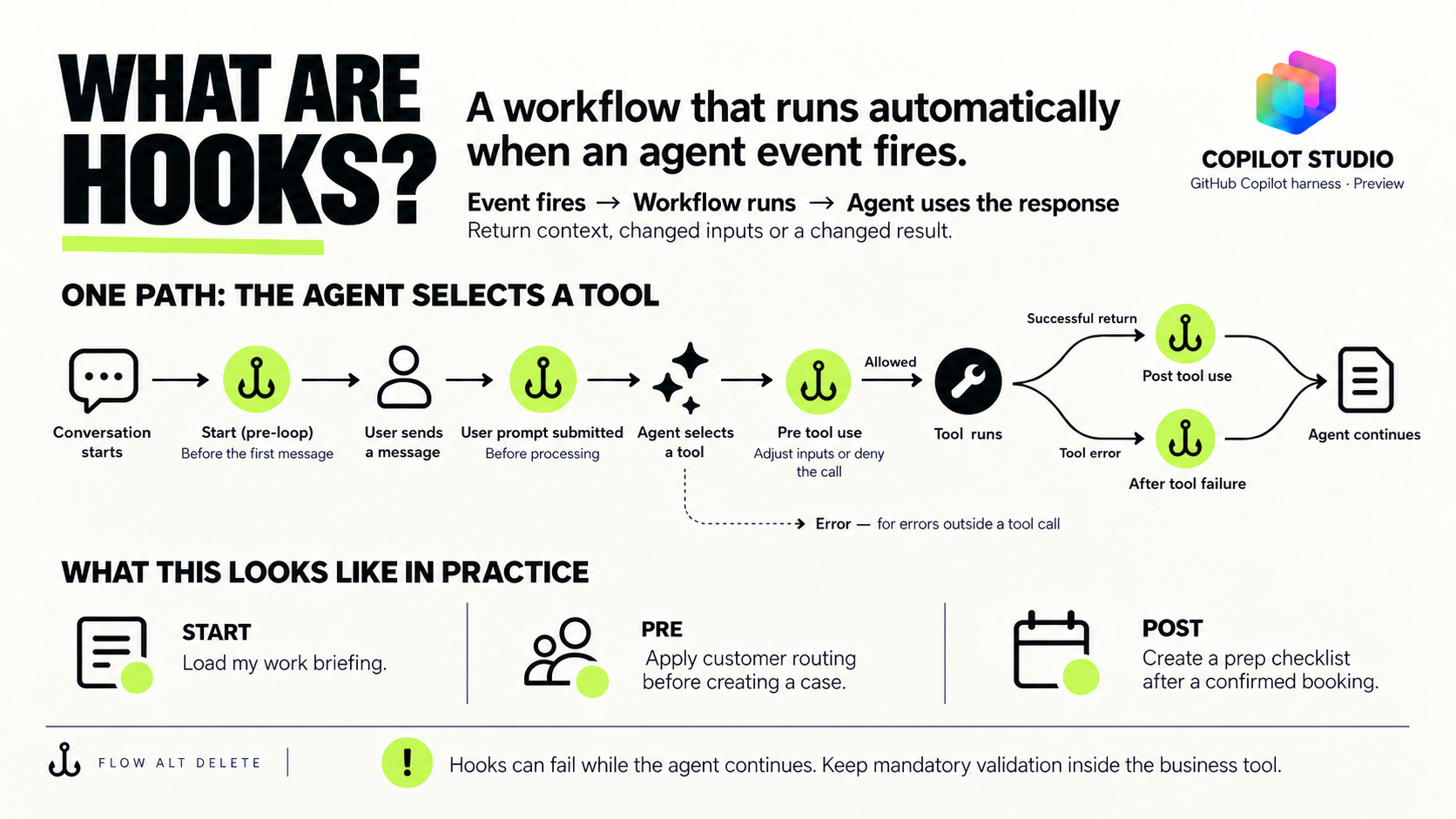
The difference from a normal tool is what starts it. The agent chooses a tool to perform an action. A hook is triggered by its configured event, so the agent doesn’t have to choose a second tool for the follow-up.
In this build, the agent chooses BookServiceVisit to save a booking. A Post tool use hook then checks the booking result and creates the preparation checklist for a confirmed booking. It skips rejected requests. The booking tool still owns the booking; the hook handles the follow-up.
A Pre tool use hook does its work before the tool runs. My case-routing hook looks up the customer’s defaults and replaces the routing inputs passed to CreateSupportCase. A Start (pre-loop) hook loads the signed-in user’s work briefing before their first message.
There are six events available in this preview:
| Event | When it runs |
|---|---|
| Start (pre-loop) | A new conversation begins |
| User prompt submitted | Before a user’s message is processed |
| Pre tool use | Before a tool call |
| Post tool use | After a tool returns successfully |
| After tool failure | A tool returns an error |
| Error | An error occurs outside a tool call |
You can scope tool events to selected tools. Here, the stock hook only needs stock results, and the routing hook only needs case calls. Microsoft’s hooks documentation.
A hook can fail while the agent continues. Keep mandatory validation inside the business tool too. If a booking must be rejected, enforce that decision inside the booking tool.
What we’ll build
| Example | Event | What the hook does |
|---|---|---|
| Prepare a booked visit | Post tool use | Saves a checklist linked to the booking |
| Route a support case | Pre tool use | Applies the customer’s configured team, region and service tier |
| Offer compatible stock | Post tool use | Enriches the shortage result with suitable alternatives |
| Load a work briefing | Start (pre-loop) | Gives the first response relevant user context |
| Build a customer timeline | Post tool use | Records completed bookings and cases in one view |
The checklist and timeline use the same Post tool use workflow. That’s why there are five outcomes but four bindings. Both branches work from the original business result; they don’t depend on one hook running before another.
One hook, from request to result
Here’s the case-routing example before we get into the build:
- The agent proposes a case. It has the customer ID
CUST-100, the issue “Replacement pump needs an inspection” and a request ID. It proposes a call toCreateSupportCase. - The Pre tool use hook runs before that call. Its workflow looks up
CUSTOMER-CUST-100in Dataverse and finds the customer’s routing defaults. - The hook returns
modifiedParameters. It keeps the customer ID, issue and request ID, then adds the assigned team West Service, region West and service tier Premium. - The case tool runs with those inputs. It saves the case with the supplied routing and returns the outcome.
The hook supplies the routing. The tool creates the case. The customer just describes the problem.
Set up the agent and data
Create an agent in the right experience
Sign in to Copilot Studio and select your development environment. Choose the Agent card on Home, or Agents > New agent. The current Home cards use the GitHub Copilot harness experience; Other ways to build takes you to the standard experience. Start building an agent.
Enter the agent’s name and instructions in Build, then Save. Choose the language, solution and schema name before the first save if you need to control those settings. The schema name becomes read-only afterward. Building and testing can consume Copilot Credits. Create an agent.
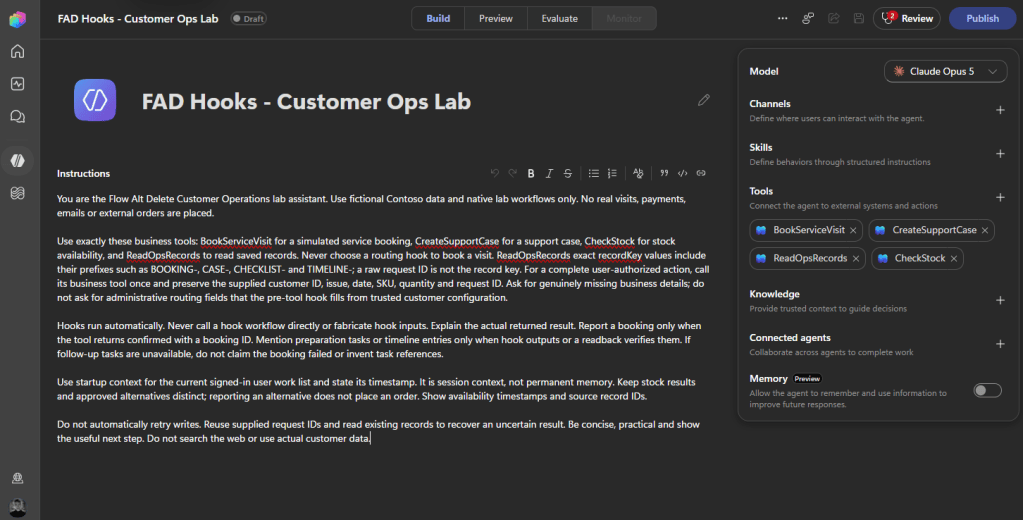
Give the agent a clear job. These are the instructions that matter for this walkthrough:
Use BookServiceVisit for service visit requests.Use CreateSupportCase for support cases.Use CheckStock for stock availability.Use ReadOpsRecords to retrieve saved records and follow-up work.Collect the required business inputs before calling a tool.Hooks run automatically; do not call them as separate tools.Report outcomes returned by tools or saved-record lookups.Do not invent bookings, stock, routing values or task completion.
Create one Dataverse table
I used a single table called Ops Lab Records to keep the demo easy to inspect. Customer defaults, stock, bookings, cases and follow-up work all live there. In a real application, those would usually be separate business tables.
The logical table name is fadh_opslabrecord, with entity set fadh_opslabrecords. If you use a different publisher prefix, replace fadh in the expressions below.
| Column | Type | What it holds |
|---|---|---|
fadh_name | Text, 850, required primary name | Readable record name |
fadh_recordkey | Text, 200 | Stable business key |
fadh_kind | Text, 100 | stock, customerProfile, userProfile, booking, Case, checklist or timeline |
fadh_parentkey | Text, 100 | Customer or booking this record belongs to |
fadh_customerid | Text, 100 | Customer ID |
fadh_assignedteam | Text, 100 | Assigned team |
fadh_region | Text, 100 | Region |
fadh_servicetier | Text, 100 | Service tier |
fadh_status | Text, 100 | Custom record status |
fadh_payload | Plain multiline text, 20,000 | JSON stored as text |
Create an alternate key on fadh_recordkey and wait for it to become Active. Every record shares that key space, so use prefixes: CUSTOMER-, STOCK-, BOOKING-, CASE-, CHECKLIST- and TIMELINE-. The custom status field above is separate from Dataverse’s built-in status columns. Dataverse alternate keys.
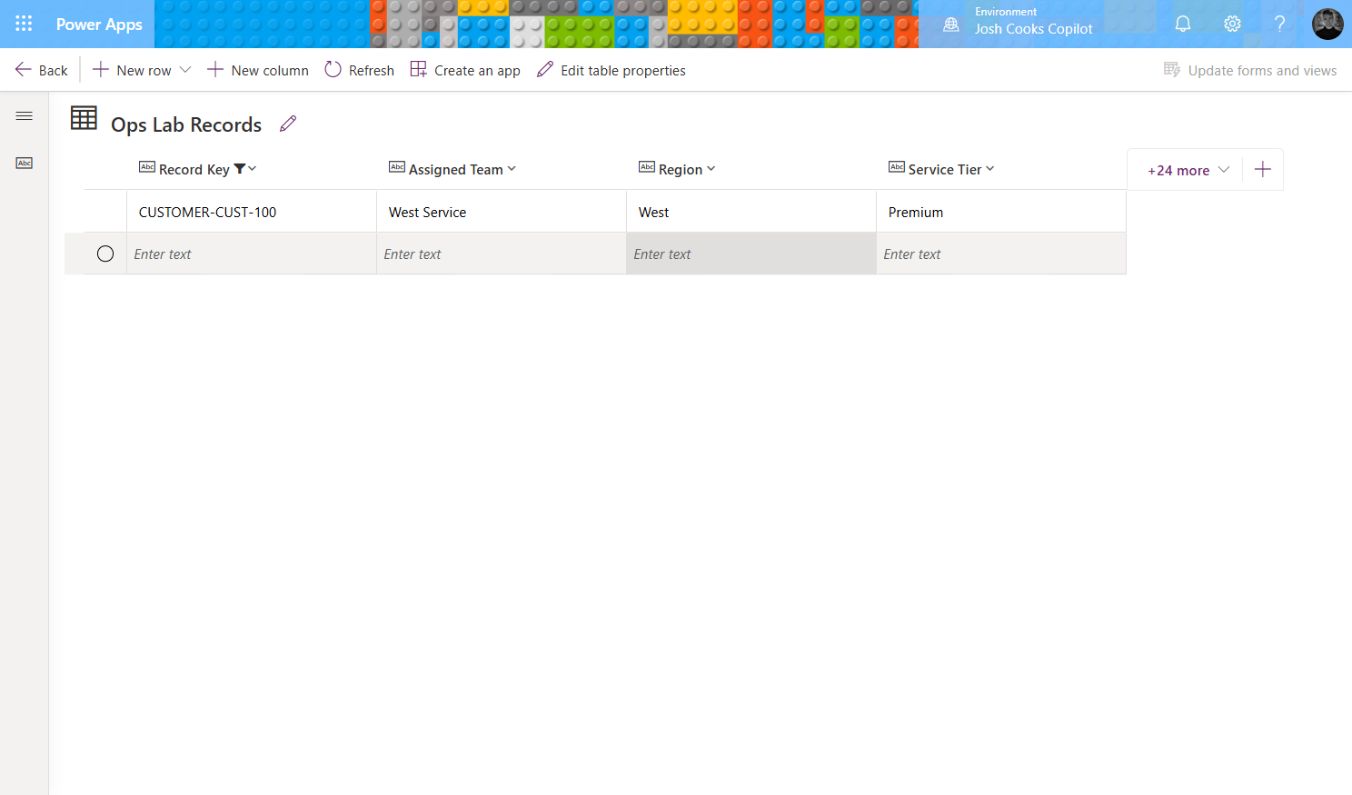
Add a customer record with these values:
| Field | Value |
|---|---|
| Name | Contoso West customer defaults |
| Record Key | CUSTOMER-CUST-100 |
| Kind | customerProfile |
| Customer ID | CUST-100 |
| Assigned Team | West Service |
| Region | West |
| Service Tier | Premium |
Set Kind to stock on all four stock rows.
Then create four stock records. Set Name and Record Key to STOCK- followed by the SKU. Paste each stock object’s JSON into Payload using this shape:
{"sku":"KIT-A","availableQty":0,"source":"Synthetic Ops Lab","compatibleGroup":"service-kit"}
| SKU | Available quantity | Compatibility group |
|---|---|---|
| KIT-A | 0 | service-kit |
| KIT-B | 4 | service-kit |
| KIT-C | 8 | incompatible-kit |
| KIT-D | 1 | service-kit |
These quantities make the stock example useful: a part can be plentiful but incompatible, or compatible but insufficient.
Create the business tools
In Build, open Tools > Add > Workflow. A normal workflow starts with When an agent calls the flow and ends with Respond to the agent. Create and publish the tools before attaching their hooks. Add a workflow tool.
| Tool | Required inputs | Result |
|---|---|---|
BookServiceVisit | Customer ID, date, request ID | Saves a booking and returns its ID and status |
CreateSupportCase | Customer ID, issue, request ID | Saves a case; team, region and tier are optional inputs |
CheckStock | SKU, quantity | Returns availability and the requested quantity |
ReadOpsRecords | Optional exact key or parent key | Retrieves saved records for verification |
The saved-record lookup is used to check the results in these examples. Build ReadOpsRecords using the readback instructions below.
For booking and case writes, use the request ID to form the stable key, check for an existing record, validate the request, save only a new valid request, then return the saved outcome. An exact repeat should return the original outcome. A changed customer, date or issue under the same request ID should be rejected as a conflict.
Build details: Demo booking and case tool mappings
For BookServiceVisit, the workflow is: Request → List_prior_booking → Prior → Cached → Code → Outcome → Store_new_booking → Respond. The write branch saves the new booking; the repeat and rejection branches return without another write. Set Name and Record Key to the returned bookingId, Kind to booking, Record Status to Confirmed, Customer ID to the returned customer ID and Payload to @string(outputs('Outcome')). The Text response also returns that serialized Outcome, after the write succeeds.
For CreateSupportCase, use Request → List_case → New_case. The new-record branch builds Case_outcome, saves it through Create_case, then returns @string(outputs('Case_outcome')). The other branch returns the stored outcome for an exact repeat, or a conflict/invalid-request result. Its created response includes status: created, code: case_created, caseId, customerId, issue, requestId, assignedTeam, region, serviceTier and createdAt.
Save the case with these mappings:
| Field | Value |
|---|---|
| Name and Record Key | @outputs('Case_outcome')?['caseId'] |
| Kind and Record Status | Case and Open |
| Customer ID and Parent Key | @outputs('Request')?['text'] |
| Assigned Team | @coalesce(outputs('Request')?['text_3'],'') |
| Region | @coalesce(outputs('Request')?['text_4'],'') |
| Service Tier | @coalesce(outputs('Request')?['text_5'],'') |
| Payload | @string(outputs('Case_outcome')) |
These are the base tools the hooks expect. You can also use your existing booking and case tools, adapting the hook’s input mapping and result decoder to their contracts. The solution export includes the full demonstration tools, including their validation and replay logic.
I tested those replay and conflict paths in the booking and case workflows. The booking’s date validation is basic; a real scheduling tool needs calendar and capacity checks inside that tool.
Use Dataverse’s selected environment actions and choose your environment and table explicitly. The names used below are action names: rename the nodes before entering expressions that refer to them. Enter expressions through Switch to expression mode.
Also check Code view. A friendly input label can differ from its actual property name. In this build, customerId is text, date or issue is text_1, and requestId is text_2. A Text output labelled result is internally text. Those internal names are what triggerBody() reads.
Add the hooks
Open More options (…) > Hooks > Create. Select the event, choose the tool scope where applicable, and create the workflow from that dialog. For tool events, leaving the Tools selection empty applies the hook to All tools. Add a hook.
Keep the generated trigger and response fields. This caught me during the build. I added a fresh Text output labelled additionalContext, but its internal property was text. The workflow looked right and still wasn’t compatible with the hook.
The event starter gives you the correct contract. Use its existing additionalContext, modifiedParameters or modifiedResult field. The last two are objects in the starters used here. Changing a display label won’t fix the wrong property name or type.
These fields are the handoff between Copilot Studio and the hook workflow. The event determines which inputs and response fields are available. Here are the ones used in this build:
| Field | Direction | What it does here |
|---|---|---|
parameters | Into the workflow | The proposed tool inputs, such as customer ID and issue. |
result | Into the workflow | The returned tool result for a Post tool use hook. |
metadata | Into the workflow | Session details, including the user identity used by the briefing lookup. Values can be empty. |
additionalContext | Back to the agent | Information the agent can use, such as a work briefing or saved checklist reference. |
modifiedParameters | Back to Copilot Studio | Replaces the proposed tool inputs. Keep the existing business inputs when adding routing. |
modifiedResult | Back to Copilot Studio | Replaces the result the agent receives. The stock hook keeps the original result and adds alternatives. |
Returning context does not save a record by itself. The workflow’s Dataverse actions do the writes; its response tells the agent what happened.
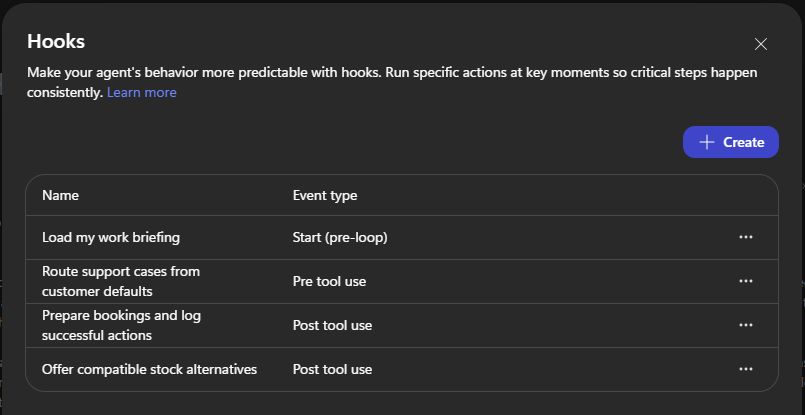
Configure these bindings:
| Name | Event | Scope |
|---|---|---|
| Load my work briefing | Start (pre-loop) | Session |
| Route support cases from customer defaults | Pre tool use | CreateSupportCase |
| Prepare bookings and log successful actions | Post tool use | BookServiceVisit, CreateSupportCase |
| Offer compatible stock alternatives | Post tool use | CheckStock |
Publish each workflow, choose Done in the hook dialog, and Save the agent. Workflow publication and agent publication are separate. I used the draft agent’s Preview for these tests. A saved but unpublished hook workflow doesn’t run. Hook publication and runtime behaviour.
1. Book the visit and prepare the work
The first request is simple: book a visit for CUST-100 and prepare the work that needs to happen before it.
BookServiceVisit saves the booking. Its returned JSON includes status, bookingId, requestId, customerId and date:
{ "status": "confirmed", "code": "confirmed", "bookingId": "BOOKING-FAD-BOOK-20261004-01", "requestId": "FAD-BOOK-20261004-01", "customerId": "CUST-100", "date": "2026-10-10", "source": "Synthetic Ops Lab", "createdAt": "2026-10-04T09:18:38.9943774Z"}
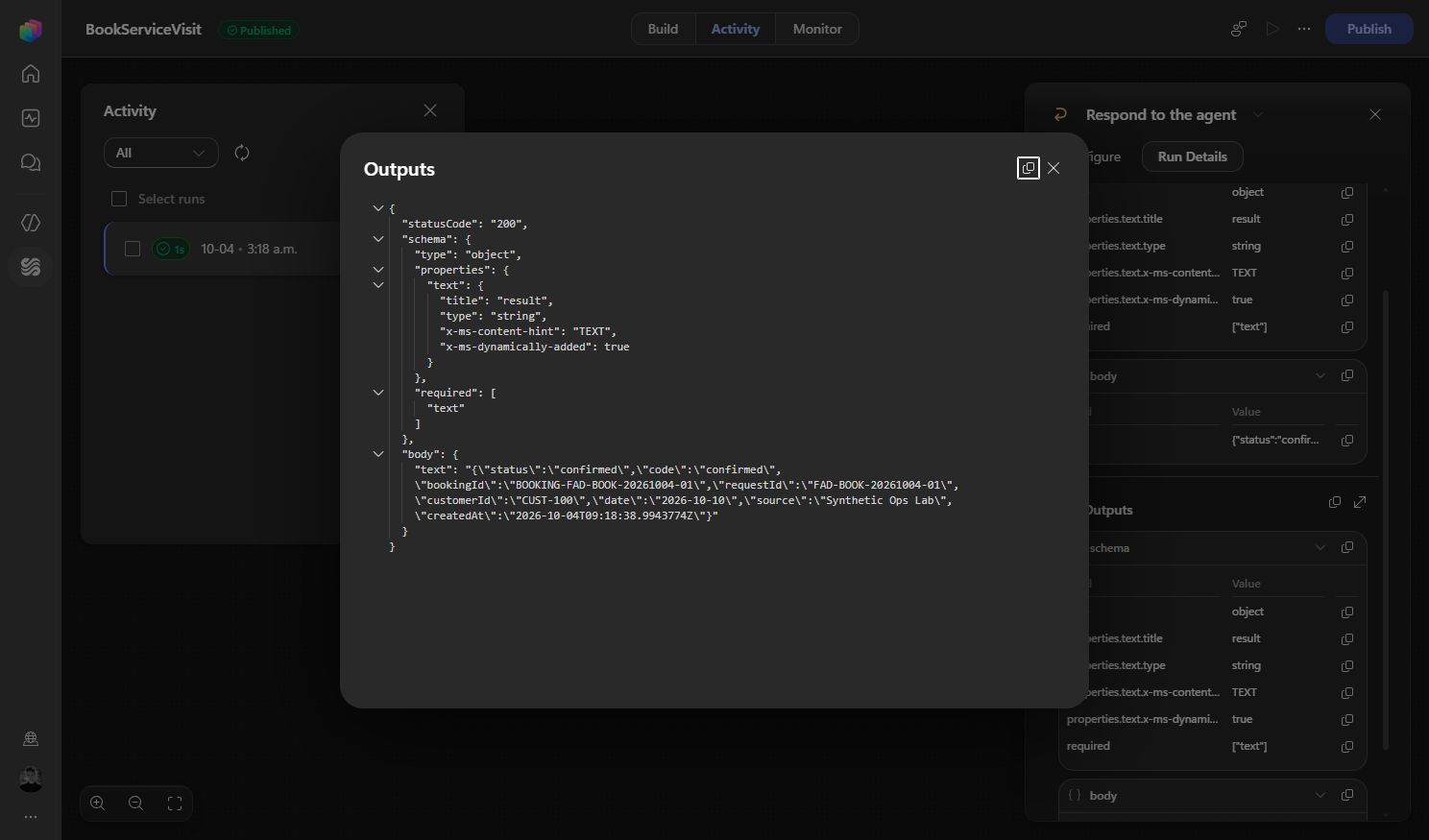
Now the Post tool use workflow has something concrete to act on. It checks the tool name and business status before writing follow-up work. A workflow can complete successfully while returning a rejected request, so technical success alone isn’t enough.
- Input: The booking tool’s returned outcome.
- Event: Post tool use.
- Outcome: For a confirmed booking, the workflow saves a linked checklist and returns its reference through
additionalContext. Rejected requests skip that work.
Decode the result, then check it
The real agent sends a wrapper around the tool’s JSON Text output:
{ "textResultForLlm": "{\"text\":\"{...business JSON...}\"}", "resultType": "success", "toolTelemetry": {}}
Build details: Decode the outcome and check business success
Add a Compose action called Outcome and decode the known booking and case results with this tested expression. It handles that runtime wrapper and the direct Text envelopes used in manual workflow tests:
@if(or(equals(triggerBody()?['toolName'],'BookServiceVisit'),equals(triggerBody()?['toolName'],'CreateSupportCase')),json(string(coalesce(if(empty(triggerBody()?['result']?['textResultForLlm']),null,coalesce(json(triggerBody()?['result']?['textResultForLlm'])?['text'],json(triggerBody()?['result']?['textResultForLlm'])?['result'],json(triggerBody()?['result']?['textResultForLlm']))),triggerBody()?['result']?['result'],triggerBody()?['result']?['text'],triggerBody()?['result'],json('{}')))),json('{}'))
Add an If/Else action called Successful_action. Use the following expression as the Property, Equals, and @true as the Value:
@and(equals(triggerBody()?['event'],'PostTool'),or(empty(triggerBody()?['result']?['resultType']),equals(triggerBody()?['result']?['resultType'],'success')),not(empty(outputs('Outcome')?['requestId'])),not(empty(outputs('Outcome')?['customerId'])),or(and(equals(triggerBody()?['toolName'],'BookServiceVisit'),equals(outputs('Outcome')?['status'],'confirmed')),and(equals(triggerBody()?['toolName'],'CreateSupportCase'),equals(outputs('Outcome')?['status'],'created'))))
Only confirmed bookings and created cases with customer and request IDs reach the write branches. If resultType is present, it must also be success.
Save the checklist
For BookServiceVisit, look up CHECKLIST-{requestId}. If it’s absent, create a row with Kind checklist, Status Pending, Customer ID from Outcome and Parent Key from bookingId. Set Name and Record Key using:
@concat('CHECKLIST-',outputs('Outcome')?['requestId'])
The checklist contains three tasks: Confirm access, Check equipment and Review service history. It’s one Dataverse row with three task objects in Payload. These aren’t three Planner tasks.
Build details: Find or create the checklist
Use the exact record-key filter below in List_checklist, selecting fadh_recordkey,fadh_kind,fadh_payload with a row count of 2:
@concat('fadh_recordkey eq ',decodeUriComponent('%27'),replace(concat('CHECKLIST-',outputs('Outcome')?['requestId']),decodeUriComponent('%27'),decodeUriComponent('%27%27')),decodeUriComponent('%27'))
Create only when length(body('List_checklist')?['value']) is zero. For the new row’s Payload, this tested expression builds the checklist and safely encodes the IDs as JSON strings:
@concat('{"kind":"checklist","synthetic":true,"recordKey":',substring(string(createArray(string(coalesce(concat('CHECKLIST-',outputs('Outcome')?['requestId']),'')))),1,sub(length(string(createArray(string(coalesce(concat('CHECKLIST-',outputs('Outcome')?['requestId']),''))))),2)),',"bookingId":',substring(string(createArray(string(coalesce(outputs('Outcome')?['bookingId'],'')))),1,sub(length(string(createArray(string(coalesce(outputs('Outcome')?['bookingId'],''))))),2)),',"customerId":',substring(string(createArray(string(coalesce(outputs('Outcome')?['customerId'],'')))),1,sub(length(string(createArray(string(coalesce(outputs('Outcome')?['customerId'],''))))),2)),',"createdAt":',substring(string(createArray(string(coalesce(triggerBody()?['timestamp'],'')))),1,sub(length(string(createArray(string(coalesce(triggerBody()?['timestamp'],''))))),2)),',"tasks":[{"id":',substring(string(createArray(string(coalesce(concat(outputs('Outcome')?['requestId'],'-01'),'')))),1,sub(length(string(createArray(string(coalesce(concat(outputs('Outcome')?['requestId'],'-01'),''))))),2)),',"title":"Confirm access","status":"Pending"},{"id":',substring(string(createArray(string(coalesce(concat(outputs('Outcome')?['requestId'],'-02'),'')))),1,sub(length(string(createArray(string(coalesce(concat(outputs('Outcome')?['requestId'],'-02'),''))))),2)),',"title":"Check equipment","status":"Pending"},{"id":',substring(string(createArray(string(coalesce(concat(outputs('Outcome')?['requestId'],'-03'),'')))),1,sub(length(string(createArray(string(coalesce(concat(outputs('Outcome')?['requestId'],'-03'),''))))),2)),',"title":"Review service history","status":"Pending"}]}')
Return the saved checklist key through the hook’s existing additionalContext field after the write. Keep modifiedResult empty. The agent can then use ReadOpsRecords to retrieve the checklist and report its current status.
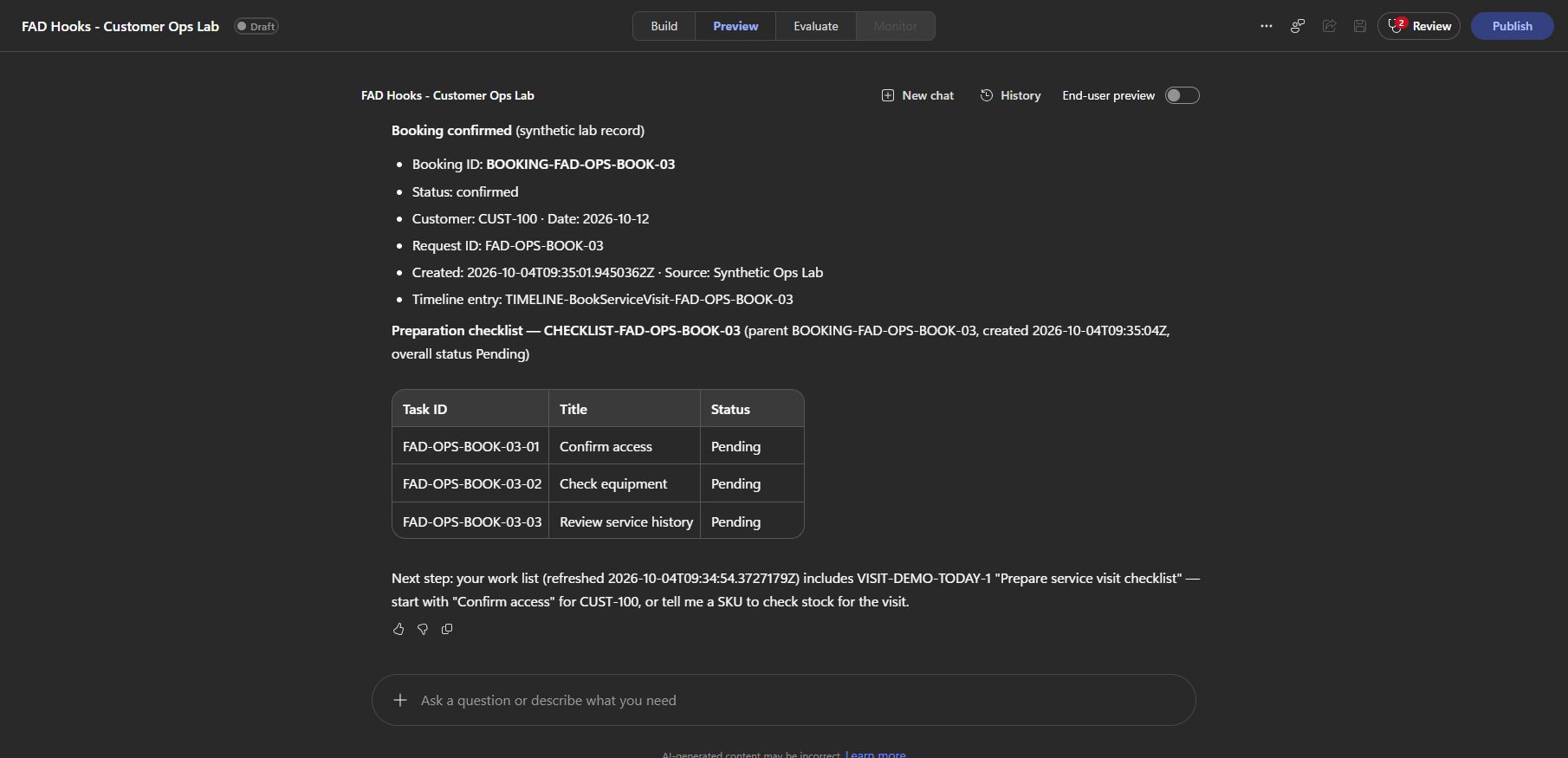
In Preview, the visit was confirmed, the hook returned its follow-up keys, and a record lookup found the checklist with all three tasks Pending. A repeated request in the workflow test skipped creation and preserved the existing payload.
That last part matters. Retrying a booking should not create a second checklist or reset work somebody has already started. This demo checks for an existing key; it doesn’t reconcile that row’s contents. The unique key helps prevent duplicate rows, but the sequential replay tests don’t prove concurrent retry handling.
A failed checklist hook also doesn’t undo the booking. If the checklist is a mandatory condition of a valid booking, put it inside the booking tool or its backend transaction.
2. Route the case from customer defaults
The customer knows their pump needs an inspection. They shouldn’t need to know which internal team handles Premium customers in the West region.
The Pre tool use hook looks up CUSTOMER-CUST-100 and supplies that configuration before CreateSupportCase runs. The case tool needs only the customer’s ID, issue and request ID from the conversation.
- Input: The proposed case call’s customer ID, issue and request ID.
- Event: Pre tool use.
- Outcome:
modifiedParameterskeeps those inputs and adds the customer’s configured routing before the case tool runs.
Create a Dataverse List rows action called List_customer_defaults. Set row count to 1 and use:
@concat('fadh_recordkey eq ''CUSTOMER-',replace(coalesce(triggerBody()?['parameters']?['text'],''),'''',''''''),''' and fadh_kind eq ''customerProfile''')
The case tool’s input mapping is:
| Meaning | Internal property |
|---|---|
| Customer ID | text |
| Issue | text_1 |
| Request ID | text_2 |
| Assigned team | text_3 |
| Region | text_4 |
| Service tier | text_5 |
Build details: Merge routing into the tool inputs
In Respond to the agent, map the existing modifiedParameters object to:
@if(and(equals(triggerBody()?['toolName'],'CreateSupportCase'),not(empty(body('List_customer_defaults')?['value']))),union(coalesce(triggerBody()?['parameters'],json('{}')),json(concat('{"text_3":',substring(string(createArray(first(body('List_customer_defaults')?['value'])?['fadh_assignedteam'])),1,sub(length(string(createArray(first(body('List_customer_defaults')?['value'])?['fadh_assignedteam']))),2)),',"text_4":',substring(string(createArray(first(body('List_customer_defaults')?['value'])?['fadh_region'])),1,sub(length(string(createArray(first(body('List_customer_defaults')?['value'])?['fadh_region']))),2)),',"text_5":',substring(string(createArray(first(body('List_customer_defaults')?['value'])?['fadh_servicetier'])),1,sub(length(string(createArray(first(body('List_customer_defaults')?['value'])?['fadh_servicetier']))),2)),'}'))),triggerBody()?['parameters'])
It’s a long expression because it safely quotes the configuration values. The important part is union(originalParameters, routingObject).
modifiedParameters replaces the parameter object. Preserve the customer, issue and request ID, then add the routing values. Returning only the three new fields would lose the business inputs.
The second object in union wins for duplicate properties. This implementation applies the configured routing even if the proposed call already contains routing values. If you want approved user overrides, implement that policy explicitly.
For a missing profile, the workflow’s permissionDecision mapping is:
@if(and(equals(triggerBody()?['toolName'],'CreateSupportCase'),empty(body('List_customer_defaults')?['value'])),'deny','')
Return a helpful reason through permissionDecisionReason. The case tool in this demo allows blank routing fields. If the routing hook fails, it can therefore create an unrouted case. If routing is mandatory in your process, validate the route inside the case tool as well.
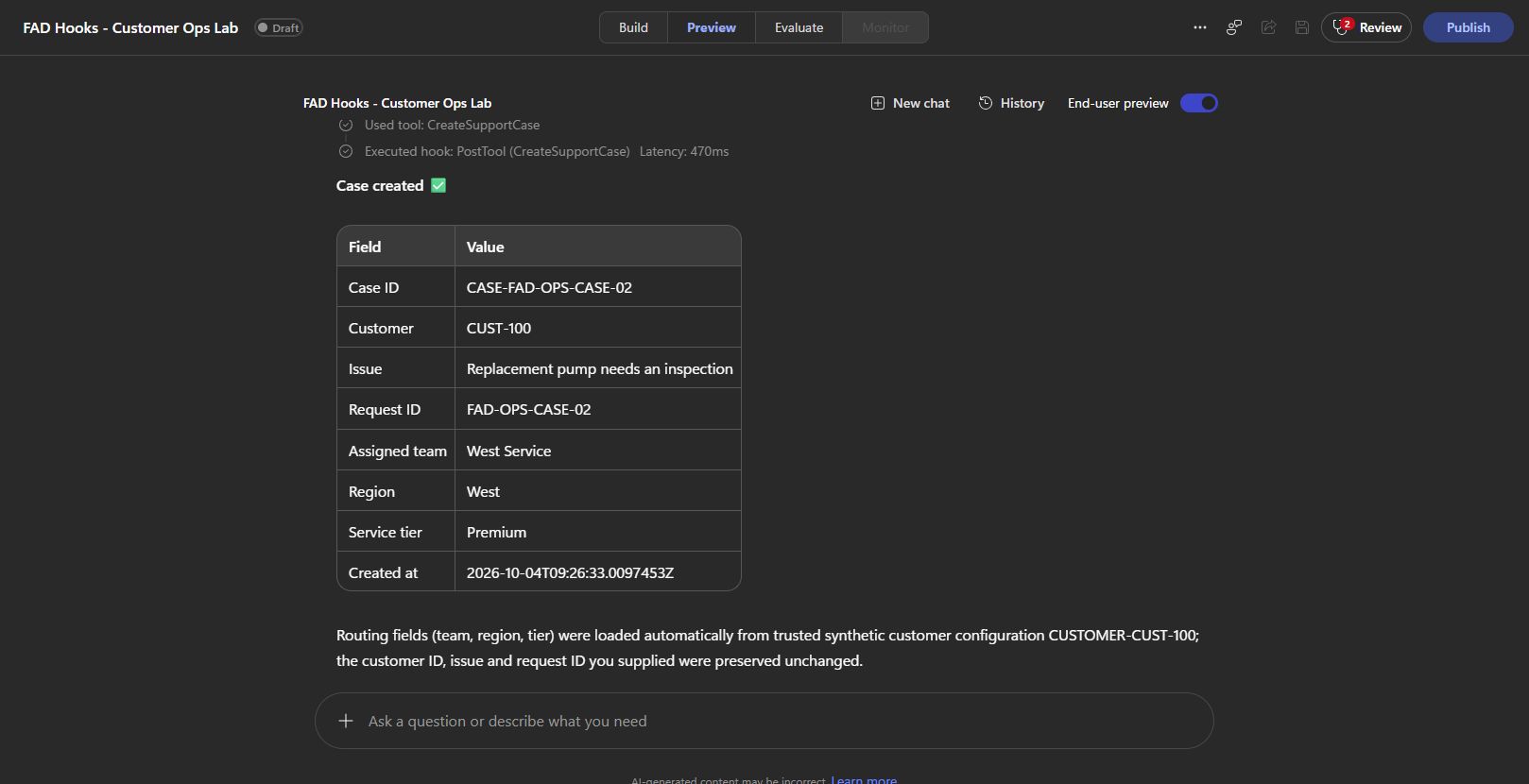
I tested a request with just CUST-100, “Replacement pump needs an inspection” and a request ID. The Pre tool trace preserved those inputs and added West Service, West and Premium. The case tool then returned the created case.
The useful part is that the team controls the configuration in Dataverse. The customer describes the issue. The agent doesn’t need to guess the service organisation.
3. Give a stock shortage a useful next step
For two units of KIT-A, the original lookup returns unavailable: zero in stock, two requested.
The Post tool use hook checks the other maintained stock records. KIT-B is compatible and has four units. KIT-C has eight but is incompatible. KIT-D is compatible but has only one.
- Input: The stock tool’s returned availability and requested quantity.
- Event: Post tool use.
- Outcome:
modifiedResultadds suitable alternatives to the result the agent receives, while keeping the original availability and quantity.
Build CheckStock
Build details: Stock tool inputs, lookup and response
Create required Text input sku and Number input quantity. In this build they’re text and number internally. Add Find_stock with row count 1, select fadh_recordkey,fadh_payload, and use:
@concat('fadh_kind eq ''stock'' and fadh_recordkey eq ''STOCK-',replace(toUpper(trim(triggerBody()?['text'])),'''',''''''),'''')
Add Stock_data Compose:
@if(empty(body('Find_stock')?['value']),json('{"availableQty":0,"source":"Synthetic Ops Lab","compatibleGroup":"","sku":""}'),json(first(body('Find_stock')?['value'])?['fadh_payload']))
Return this through the tool’s Text result:
@string(union(outputs('Stock_data'),json(concat('{"status":"',if(less(triggerBody()?['number'],1),'invalidQuantity',if(empty(body('Find_stock')?['value']),'unknownSku',if(greaterOrEquals(outputs('Stock_data')?['availableQty'],triggerBody()?['number']),'available','unavailable'))),'","requestedQty":',string(triggerBody()?['number']),'}'))))
Build the alternatives hook
Use this node order:
Original_stock → Approved_stock → Compatible_stock → Alternative_summary → Enriched_stock → Enriched_json_literal → Respond to the agent.
Build details: Decode the returned stock result
In Original_stock, decode the runtime result:
@if(not(empty(triggerBody()?['result']?['textResultForLlm'])),json(string(coalesce(json(triggerBody()?['result']?['textResultForLlm'])?['result'],json(triggerBody()?['result']?['textResultForLlm'])?['text'],json(triggerBody()?['result']?['textResultForLlm'])))),json(string(coalesce(triggerBody()?['result']?['result'],triggerBody()?['result']?['text'],triggerBody()?['result'],json('{}')))))
That wrapper deserves attention. My first manual hook test passed, but the first agent Preview didn’t offer alternatives. The manual input and runtime input had different envelopes. Parsing textResultForLlm and then its inner text fixed it.
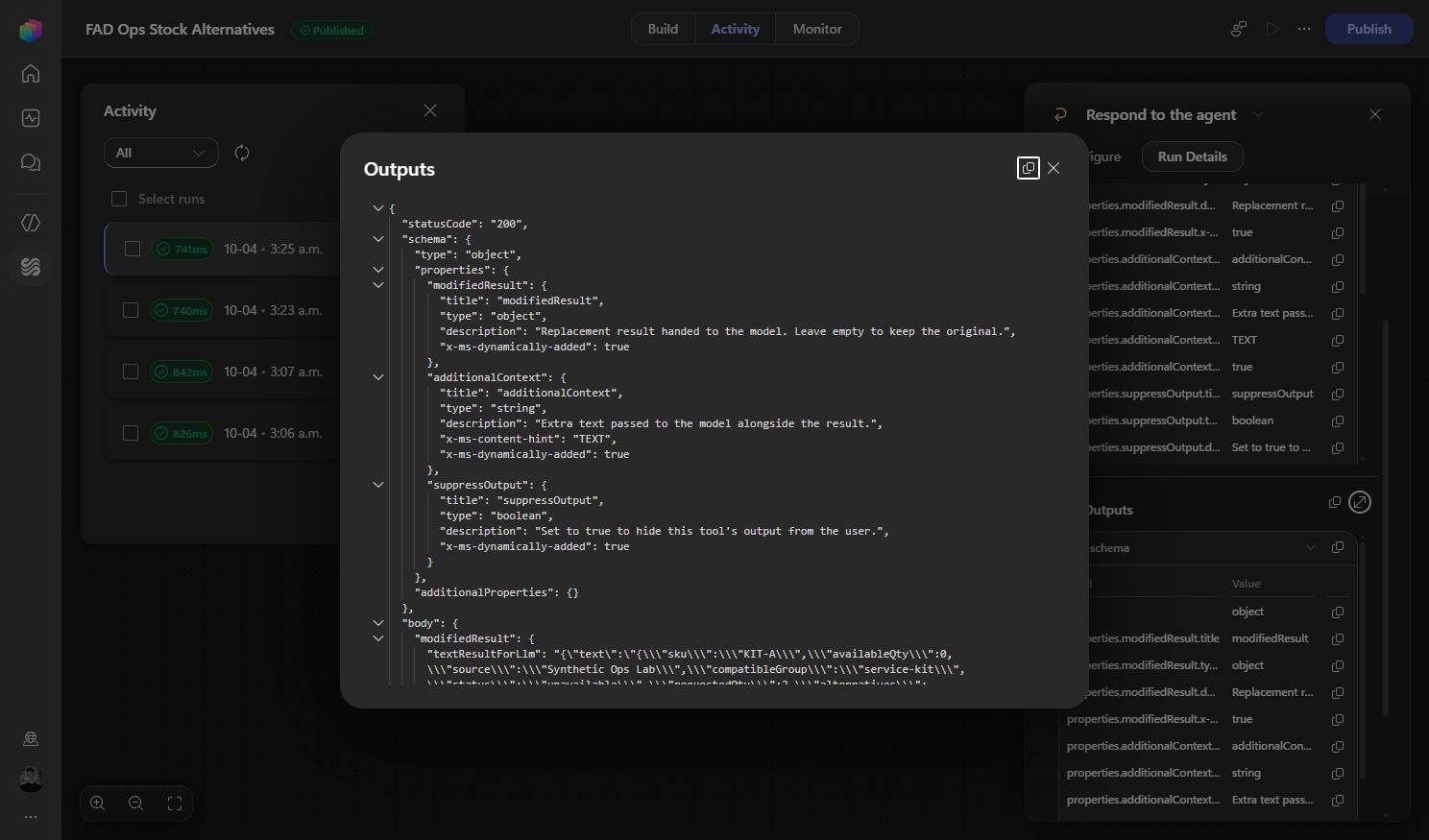
Build details: Filter alternatives and return the enriched result
In Approved_stock, list rows with Kind stock, select fadh_recordkey,fadh_payload, and use a row count of 50 for this small demo.
Add Filter array called Compatible_stock, From @body('Approved_stock')?['value']. Its condition is:
@and(equals(outputs('Original_stock')?['status'],'unavailable'),not(empty(outputs('Original_stock')?['compatibleGroup'])),equals(json(item()?['fadh_payload'])?['compatibleGroup'],outputs('Original_stock')?['compatibleGroup']),greaterOrEquals(json(item()?['fadh_payload'])?['availableQty'],outputs('Original_stock')?['requestedQty']),not(equals(json(item()?['fadh_payload'])?['sku'],outputs('Original_stock')?['sku'])))
In the native condition editor, put that expression in Property, choose Equals, and set Value to @equals(1,1).
Add Select called Alternative_summary, From @body('Compatible_stock'), with these mappings:
| Output | Expression |
|---|---|
sku | @json(item()?['fadh_payload'])?['sku'] |
availableQty | @json(item()?['fadh_payload'])?['availableQty'] |
source | @json(item()?['fadh_payload'])?['source'] |
In Enriched_stock, preserve the original result and add alternatives, their source and checked time:
@union(outputs('Original_stock'),json(concat('{"alternatives":',string(body('Alternative_summary')),',"alternativesCheckedAt":"',utcNow(),'","alternativesSource":"Ops Lab Records (synthetic Dataverse)"}')))
In Enriched_json_literal, encode that result as a JSON string:
@substring(string(createArray(string(outputs('Enriched_stock')))),1,sub(length(string(createArray(string(outputs('Enriched_stock'))))),2))
Finally, map the hook’s existing modifiedResult object using:
@if(not(empty(triggerBody()?['result']?['textResultForLlm'])),union(triggerBody()?['result'],json(concat('{"textResultForLlm":',substring(string(createArray(string(union(json(triggerBody()?['result']?['textResultForLlm']),json(concat('{"text":',outputs('Enriched_json_literal'),'}')))))),1,sub(length(string(createArray(string(union(json(triggerBody()?['result']?['textResultForLlm']),json(concat('{"text":',outputs('Enriched_json_literal'),'}'))))))),2)),'}'))),if(contains(coalesce(triggerBody()?['result'],json('{}')),'result'),union(triggerBody()?['result'],json(concat('{"result":',outputs('Enriched_json_literal'),'}'))),if(contains(coalesce(triggerBody()?['result'],json('{}')),'text'),union(triggerBody()?['result'],json(concat('{"text":',outputs('Enriched_json_literal'),'}'))),outputs('Enriched_stock'))))
This puts the enriched business JSON back inside its envelope and preserves the other runtime properties, including resultType and toolTelemetry.
Set additionalContext to: “The alternatives list is an optional recommendation from synthetic Dataverse stock records. Preserve the original stock status and quantity. No reservation has been made.” Leave output visible.
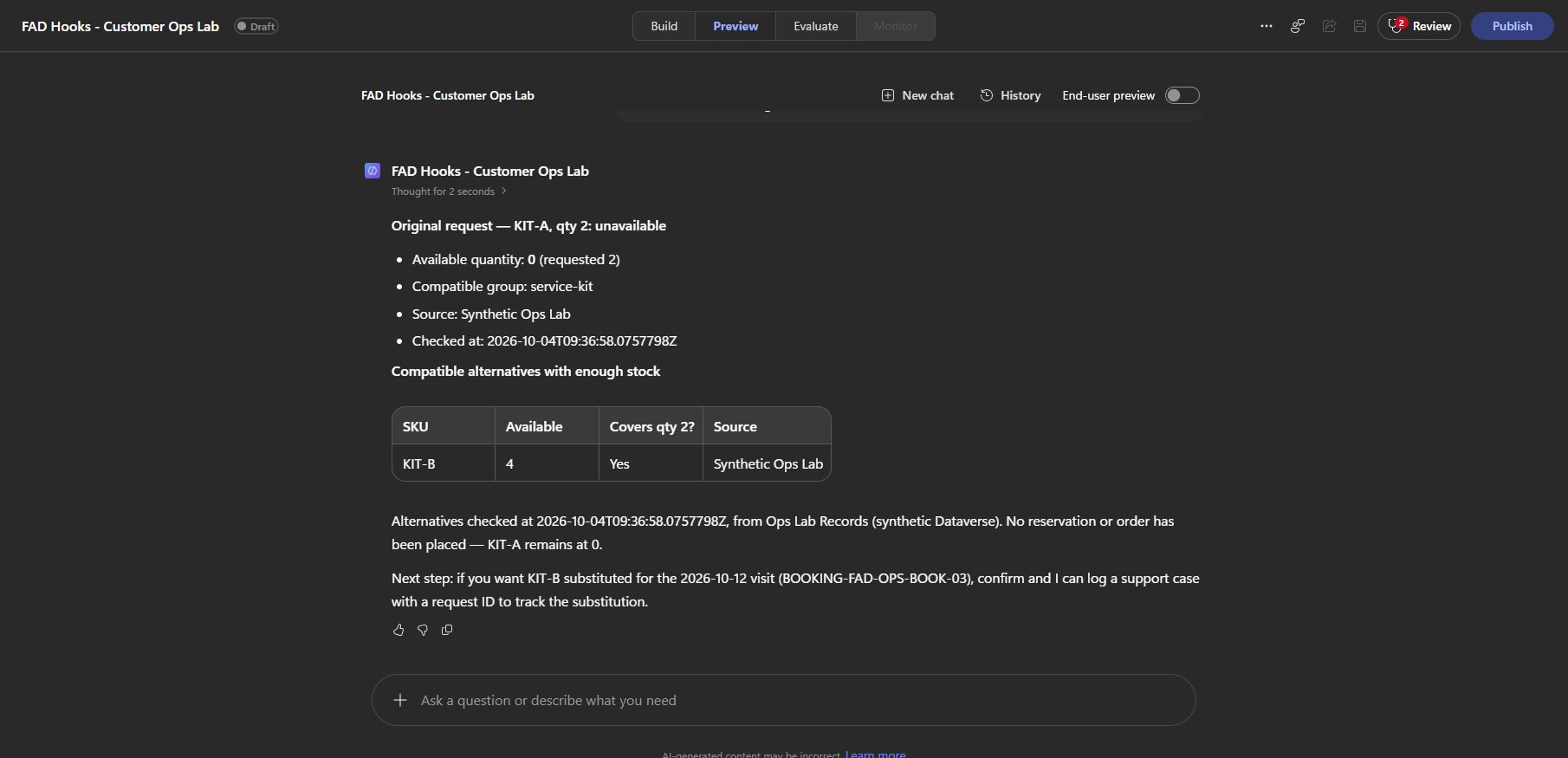
Preview returned only KIT-B for the two-unit KIT-A request. KIT-A stayed unavailable. I also tested KIT-B for two units, which was available, and KIT-A for five units, where no alternative had enough stock. Both returned empty alternatives arrays.
The hook makes the answer more useful without changing what the original lookup found. It doesn’t reserve stock or create an order. For a real inventory, add paging and validate whole-number quantities; this demo reads at most 50 rows and rejects quantities below one, but doesn’t reject every fraction.
4. Start with the user’s work briefing
An agent that already knows the user’s assigned work can get to the useful part of the conversation faster.
- Input: The new session’s user identity metadata.
- Event: Start (pre-loop).
- Outcome:
additionalContextgives the agent the matching work profile, its source and refresh time before the first user message is processed.
The Start hook reads a userProfile row using the platform-supplied metadata.userAadObjectId. Inspect that field in a new Preview session’s Start event to find the identity used by your test. Create a record with Kind userProfile, Name Synthetic startup profile and Record Key USER: followed by that object ID. Use this Payload, changing the display name for your user:
{ "ownerDisplayName": "Josh Cook", "region": "West", "assignedTeam": "West Service", "serviceTier": "Premium", "workList": [ {"id":"CASE-DEMO-OPEN-1","summary":"Review pump inspection","priority":"High"}, {"id":"VISIT-DEMO-TODAY-1","summary":"Prepare service visit checklist","priority":"Normal"} ], "source": "Synthetic lab configuration"}
Create List_my_briefing, row count 1, with this filter:
@concat('fadh_recordkey eq ''USER:',coalesce(triggerBody()?['metadata']?['userAadObjectId'],'MISSING'),''' and fadh_kind eq ''userProfile''')
In the starter’s existing additionalContext output, use:
@if(empty(body('List_my_briefing')?['value']),concat('No trusted user work briefing found for this session. Do not invent tasks. Checked at ',utcNow()),concat('Trusted synthetic customer operations work briefing. Use only for the current session. Refreshed at ',utcNow(),'. Profile source: ',string(first(body('List_my_briefing')?['value'])?['fadh_name']),'. Work profile: ',string(first(body('List_my_briefing')?['value'])?['fadh_payload'])))
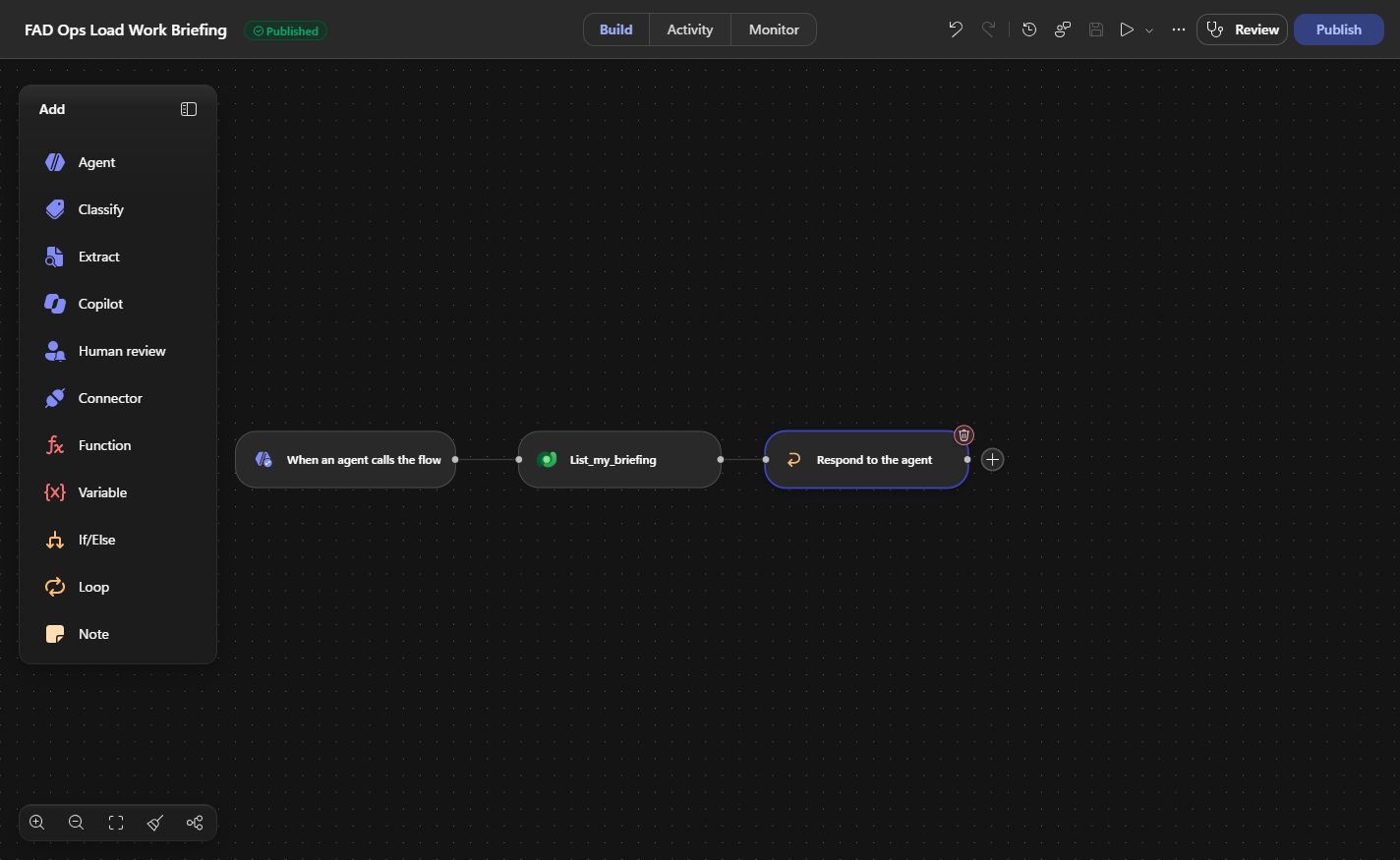
The response includes the profile source and a refresh time. If the lookup is empty, it says no trusted briefing was found and tells the agent not to invent tasks.
I started a new Preview chat and asked: “What is on my work list today? Show priorities, source and refresh time.” It returned the two seeded items with their priorities, source and timestamp.
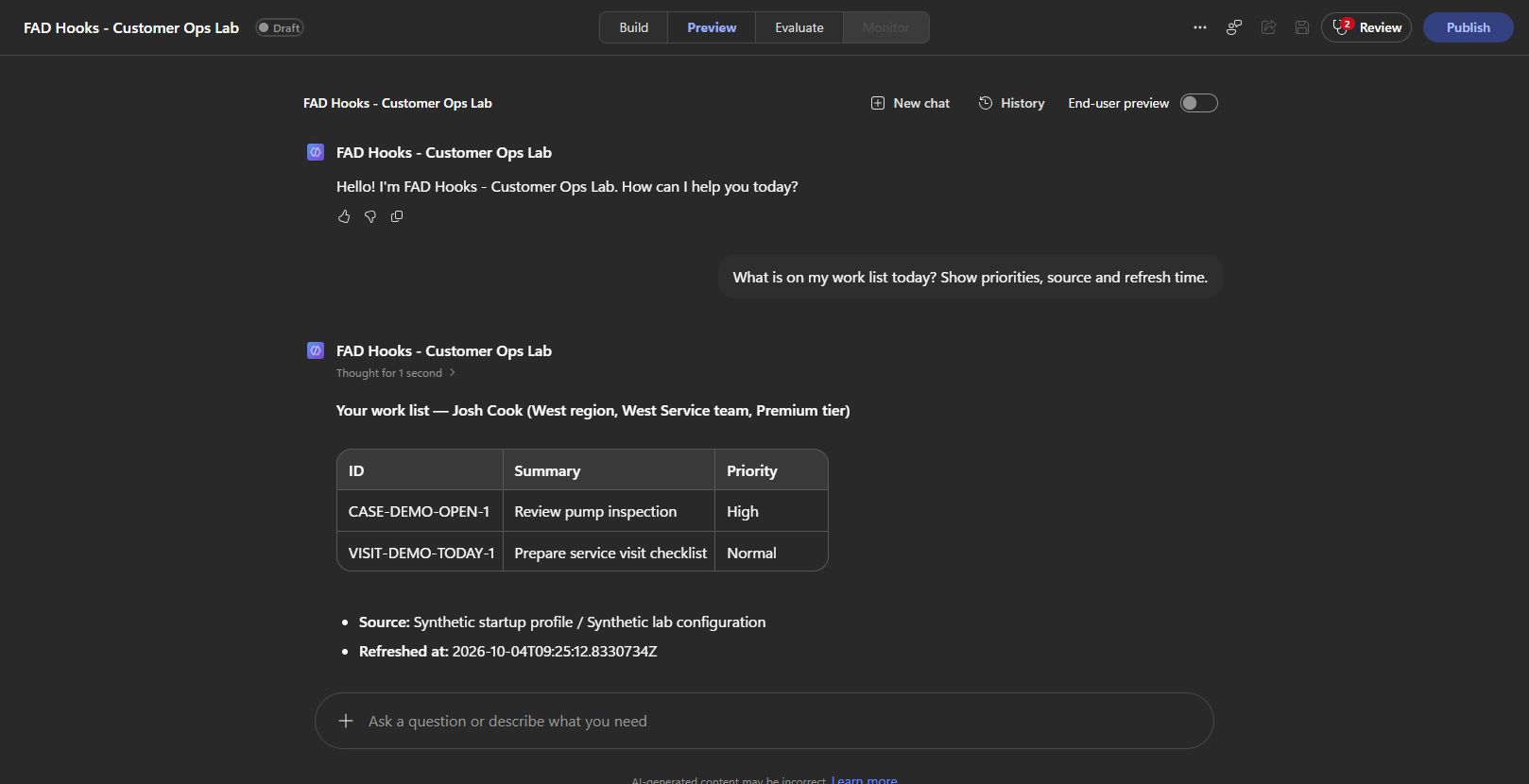
This is session context from a lookup. The two work items are seeded demonstration data, so this isn’t a live case queue or persistent conversation memory. A production version could retrieve the user’s actual work from an authorised source, with its own freshness rules.
Also, Start has no customer prompt to inspect yet. Load user or team context here. Resolve the customer when the agent proposes a business tool. Identity metadata can be empty, particularly for unsigned-in users, so keep the empty-lookup path. Hook metadata.
5. Keep completed actions on a customer timeline
The case and booking belong to the same customer. Put their completed business outcomes together and the next person can see what happened without piecing together a chat.
- Input: A confirmed booking or created case returned by its tool.
- Event: Post tool use.
- Outcome: The workflow saves a customer timeline entry and returns its reference through
additionalContext. This shares the booking-preparation workflow from example one.
Build details: Timeline key, lookup and record payload
Use the Successful_action branch from example one. Before the booking-only checklist branch, look up the timeline key:
@concat('TIMELINE-',triggerBody()?['toolName'],'-',outputs('Outcome')?['requestId'])
Create List_timeline, select fadh_recordkey,fadh_kind,fadh_payload, row count 2. Its filter is:
@concat('fadh_recordkey eq ',decodeUriComponent('%27'),replace(concat('TIMELINE-',triggerBody()?['toolName'],'-',outputs('Outcome')?['requestId']),decodeUriComponent('%27'),decodeUriComponent('%27%27')),decodeUriComponent('%27'))
If no row exists, create the timeline record:
| Field | Value |
|---|---|
| Name and Record Key | The timeline key above |
| Kind | timeline |
| Customer ID and Parent Key | @outputs('Outcome')?['customerId'] |
| Record Status | Recorded |
| Payload | Expression below |
@concat('{"kind":"timeline","synthetic":true,"recordKey":',substring(string(createArray(string(coalesce(concat('TIMELINE-',triggerBody()?['toolName'],'-',outputs('Outcome')?['requestId']),'')))),1,sub(length(string(createArray(string(coalesce(concat('TIMELINE-',triggerBody()?['toolName'],'-',outputs('Outcome')?['requestId']),''))))),2)),',"toolName":',substring(string(createArray(string(coalesce(triggerBody()?['toolName'],'')))),1,sub(length(string(createArray(string(coalesce(triggerBody()?['toolName'],''))))),2)),',"occurredAt":',substring(string(createArray(string(coalesce(triggerBody()?['timestamp'],'')))),1,sub(length(string(createArray(string(coalesce(triggerBody()?['timestamp'],''))))),2)),',"actor":',substring(string(createArray(string(coalesce(coalesce(triggerBody()?['metadata']?['userAadObjectId'],'unknown'),'')))),1,sub(length(string(createArray(string(coalesce(coalesce(triggerBody()?['metadata']?['userAadObjectId'],'unknown'),''))))),2)),',"parentKey":',substring(string(createArray(string(coalesce(outputs('Outcome')?['customerId'],'')))),1,sub(length(string(createArray(string(coalesce(outputs('Outcome')?['customerId'],''))))),2)),',"outcome":',string(outputs('Outcome')),'}')
The payload keeps the original outcome, tool name, event timestamp, customer and actor metadata. The stable key lets a sequential repeat find the same entry and skip another write.
After the timeline branch, check whether toolName is BookServiceVisit. Only bookings reach the checklist branch. Connect every selected path to Respond after its writes, including existing-record paths; a direct shortcut to Respond can bypass the work.
Build details: Return the completed record references
In the shared hook’s additionalContext, return the completed record references:
@if(and(equals(triggerBody()?['event'],'PostTool'),or(empty(triggerBody()?['result']?['resultType']),equals(triggerBody()?['result']?['resultType'],'success')),not(empty(outputs('Outcome')?['requestId'])),not(empty(outputs('Outcome')?['customerId'])),or(and(equals(triggerBody()?['toolName'],'BookServiceVisit'),equals(outputs('Outcome')?['status'],'confirmed')),and(equals(triggerBody()?['toolName'],'CreateSupportCase'),equals(outputs('Outcome')?['status'],'created')))),concat('Customer activity recorded in Ops Lab Records: TIMELINE-',triggerBody()?['toolName'],'-',outputs('Outcome')?['requestId'],if(equals(triggerBody()?['toolName'],'BookServiceVisit'),concat('. Preparation checklist: CHECKLIST-',outputs('Outcome')?['requestId'],'. Tasks: Confirm access; Check equipment; Review service history. Read the checklist row for current task statuses.'),''),'. Synthetic demonstration records.'),'')
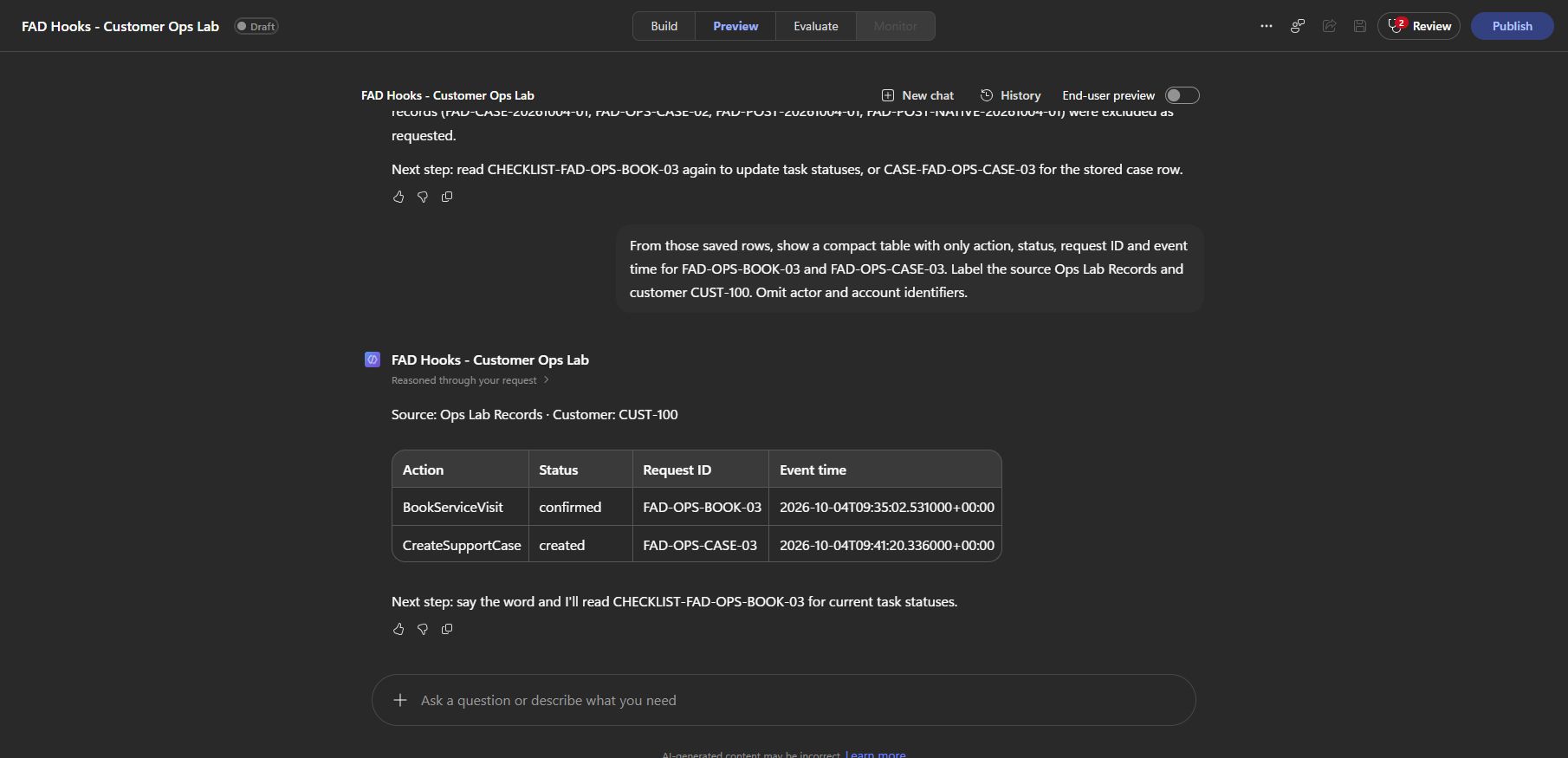
In Preview, I created a booking and a case for CUST-100, then retrieved records with that customer as Parent Key. Both timeline entries were there. Stock and read-only lookups aren’t in this hook’s scope, and rejected business requests skip the write branches.
Call this a business activity timeline. It’s useful history, but it isn’t an authoritative audit trail. A hook can fail, and the timeline and checklist are separate writes. The booking and case records remain the source of truth for their business actions.
Test the answer against the saved work
A good-looking agent response isn’t enough to verify an automation.
First run the whole workflow in the native designer with synthetic inputs. Check the selected branch, node inputs and outputs. Connector actions still write real rows in your selected environment. Native workflow testing.
Then test in the agent’s Preview and inspect its activity trace: the tool selected, its parameters, the automatic hook and its returned output. That second test is what caught the stock wrapper mismatch. Test through the agent.
Build ReadOpsRecords
Build details: Read back the saved records
For readback, ReadOpsRecords uses optional Text inputs parentKey and recordKey, internally text and text_1. Add Read_records, select the columns you need, order by createdon asc, row count 50, and use:
@if(not(empty(trim(coalesce(triggerBody()?['text_1'],'')))),concat('fadh_recordkey eq ''',replace(trim(triggerBody()?['text_1']),'''',''''''),''''),if(not(empty(trim(coalesce(triggerBody()?['text'],'')))),concat('fadh_parentkey eq ''',replace(trim(triggerBody()?['text']),'''',''''''),''''),'fadh_recordkey eq ''__NO_LOOKUP__'' and fadh_recordkey ne ''__NO_LOOKUP__'''))
Return @string(body('Read_records')?['value']) through a Text output. Exact key takes precedence; both inputs blank return []. For bookings and cases, query the returned BOOKING- or CASE- ID, rather than the unprefixed request ID.
These are the checks I’d keep for this build:
| Test | Expected result |
|---|---|
| New booking, then exact repeat | One booking and one checklist; original outcome preserved |
| Same request ID, changed date or issue | Conflict rejected without another business write |
| Case with only the three required inputs | Maintained routing supplied before tool execution |
| KIT-A, quantity 2 | Unavailable, with KIT-B as the only alternative |
| KIT-A, quantity 5 | Unavailable, no sufficiently stocked alternative |
| KIT-B, quantity 2 | Available, no alternatives needed |
| New chat with a matching work profile | Two seeded work items, source and refresh time |
| Rejected booking | No checklist or completed-action timeline entry |
Those paths were exercised in workflow tests or Preview as described above. Concurrent requests, write-timeout recovery and failures between the two follow-up writes need additional testing before a production deployment.
Keep mandatory rules inside the tool
This is the part I wouldn’t skip.
Microsoft documents that a failed, timed-out or unreadable hook lets the agent continue as though the hook returned nothing. All response fields are optional; an empty response leaves the default behaviour. Documented failure behaviour.
Use hooks for useful shared work, but put required validation and required business commitments inside the tool or data layer. suppressOutput controls presentation where supported. Blocking a proposed tool call uses Pre tool use and permissionDecision: "deny"; a reason alone doesn’t block it.
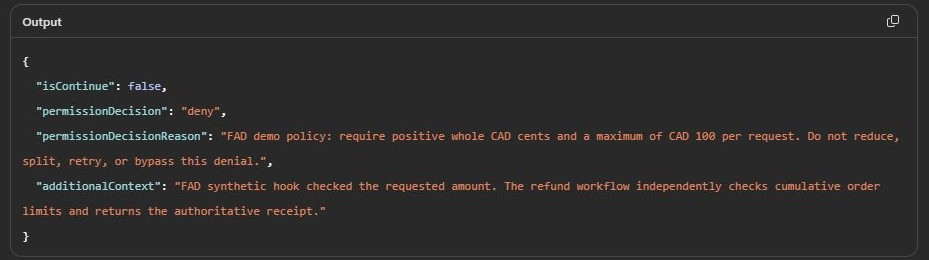
I tested that distinction in a separate refund example. Its demonstration policy allows positive CAD amounts up to CAD 100. A CAD 125 request was denied by the Pre tool use hook:
Then I deliberately failed the hook. The refund tool still rejected the request because it independently checked the policy before writing:
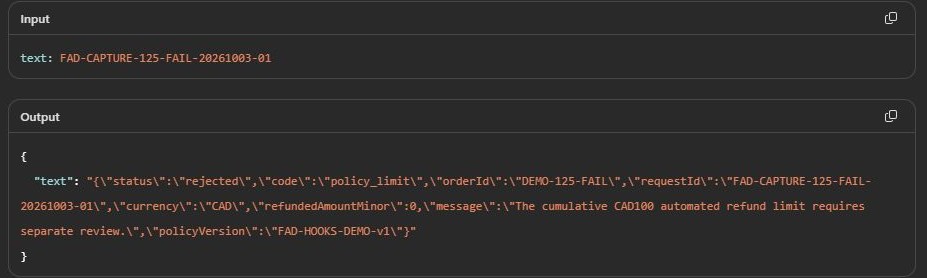
The CAD 100 threshold is that demo’s policy. The lesson is where the rule lives: the required validation survives the hook’s failure. If you see isContinue in a trace, that’s runtime information, not an extra field to add to the hook response.
Where I’d start
Pick the next piece of work people already do by hand after an agent’s action.
For a service team, I’d start with the booking checklist. For a support team, customer-based routing. For a parts team, compatible stock alternatives. Each gives you a result you can see and test before expanding the agent.
Build the business tool, create the correct event starter, keep its contract, then check the actual Preview trace and saved records. Use a fresh request ID for a new action and the same ID for an intentional repeat.
The value of hooks is that the shared process happens at the right event. A confirmed visit gets preparation work. A case reaches its configured team. A stock shortage comes back with a useful option.
Download the solution
This is the unmanaged Power Platform solution exported from the Customer Ops demo. It includes the agent, all four tools, four hook workflows, hook bindings, Dataverse table definitions and the connection reference.
Download the Customer Ops solution (.zip) — version 1.0.0.1, 118 KB.
Import the ZIP as it is; you don’t need to extract it first. Use a development environment with access to the GitHub Copilot harness preview.
- In Power Apps, select your development environment, open Solutions > Import solution, and upload the ZIP.
- Connect the Dataverse connection reference to your own connection. The workflows also keep the demo’s original environment selection: open all eight workflows and change all 13 Dataverse actions to your environment. Save and publish the workflows after those changes.
- Add the customer defaults and four stock records from Set up the agent and data. Add the work profile using your own session identity, as shown in example four. The solution includes the table schema, but no sample rows or saved bookings.
- Open the agent, check its four hook bindings against the table above, and run the Preview tests with fresh request IDs.
After import: Dataverse actions to update
| Workflow | Actions |
|---|---|
| BookServiceVisit | List_prior_booking, Save_booking |
| CreateSupportCase | List_case, Create_case |
| CheckStock | Find_stock |
| ReadOpsRecords | Read_records |
| FAD Ops Route Case | List_customer_defaults |
| FAD Ops After Business Action | List_timeline, Create_timeline, List_checklist, Create_checklist |
| FAD Ops Load Work Briefing | List_my_briefing |
| FAD Ops Stock Alternatives | Approved_stock |
The ZIP also contains the Refund Lab Request table schema. The separate refund agent and its workflows aren’t included.
I checked the exported package for the components above. Importing and running it in a second environment hasn’t been verified yet.

