
GPT-5.6 is available in Copilot Cowork.
But if you open the model picker and only see GPT 5.5, the problem may not be your Cowork license or the rollout.
There is one Microsoft 365 admin setting you need to check first.
OpenAI must be enabled as a Microsoft subprocessor before users can access the new OpenAI-operated models.
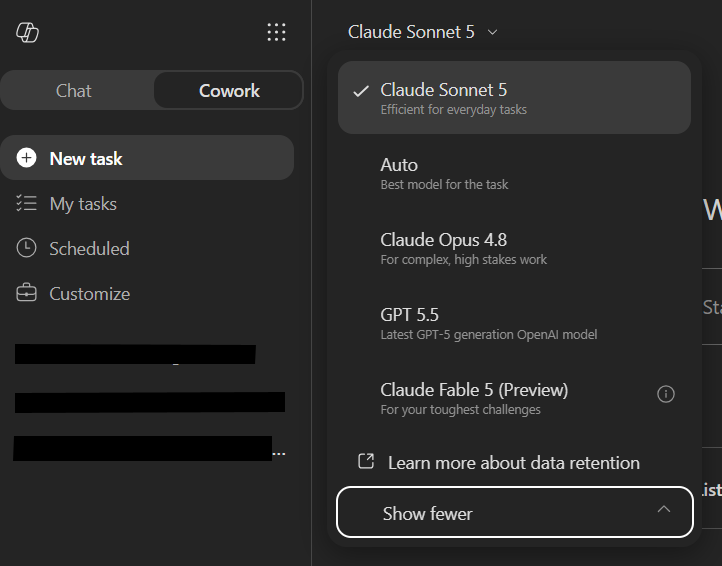
The hidden dependency behind GPT-5.6 in Cowork
Microsoft now supports OpenAI-operated models in Microsoft 365 Copilot experiences. That is different from OpenAI models operated by Microsoft through Azure OpenAI.
For GPT-5.6, Microsoft’s documentation is direct: if you want to use GPT-5.6, you need to enable OpenAI-operated models.
That means the model picker is not the first place to troubleshoot. Start in the Microsoft 365 admin center.
Where to enable OpenAI as a subprocessor
You need to be a Global Administrator or AI Administrator to change this setting.
Go to the Microsoft 365 admin center and follow these steps:
- Open Copilot.
- Select Settings.
- Select View all.
- Open AI providers operating as Microsoft subprocessors.
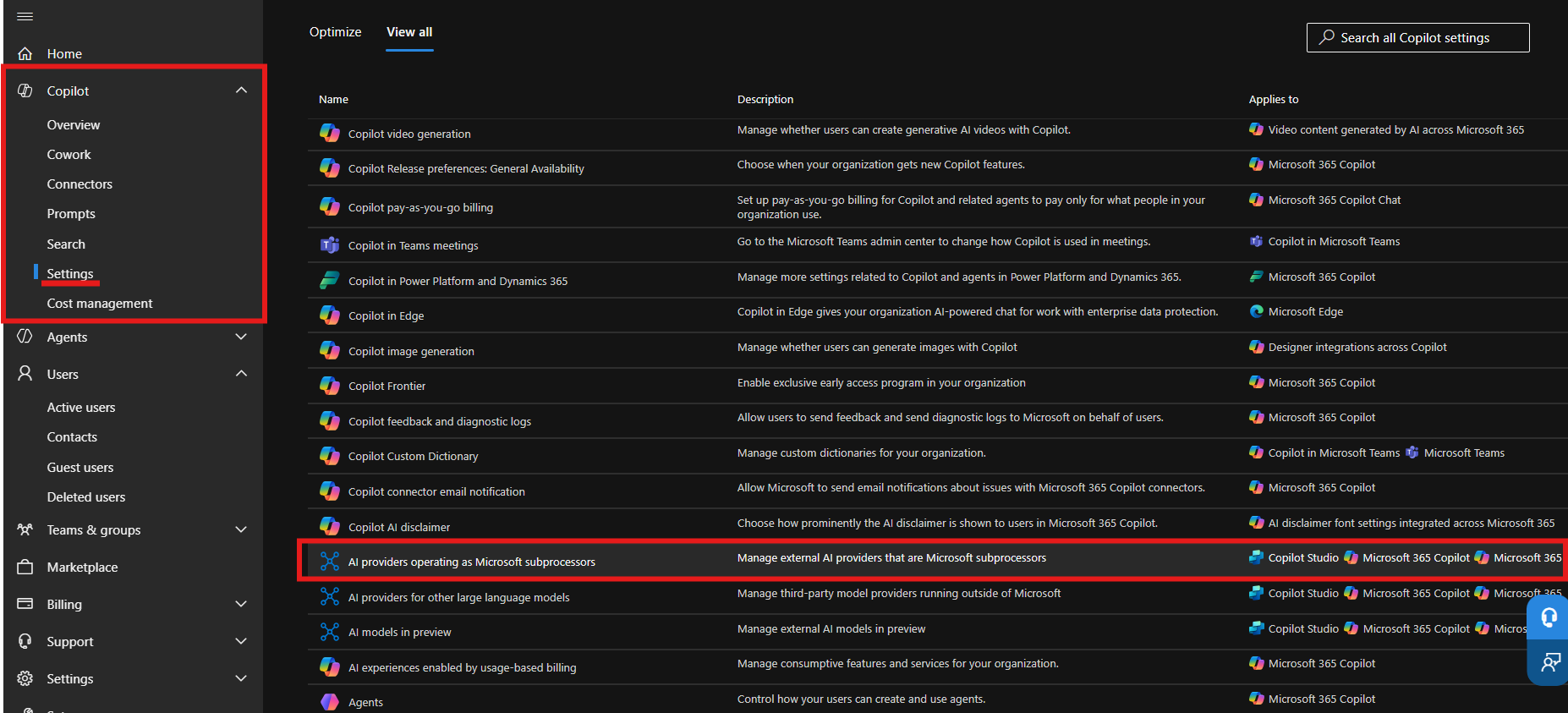
Choose who gets access
Expand OpenAI. From there, choose which users can access OpenAI-operated models:
- All users
- No users
- Specific users and groups
Then select Save.
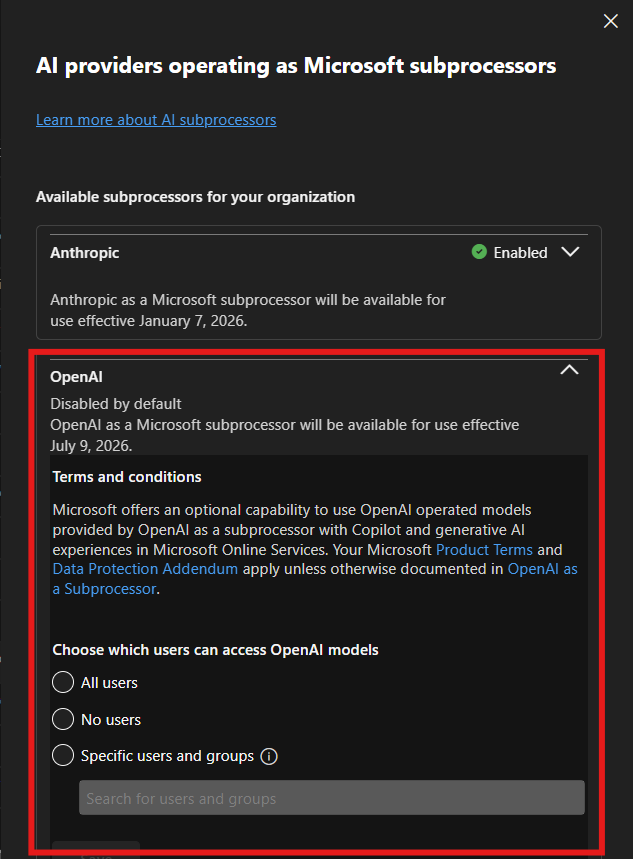
For a pilot, I would start with Specific users and groups.
This setting is applied at the provider level across supported Microsoft 365 Copilot and Copilot Studio experiences. Scoping it to a security group gives you a clean way to test the new models with a small group before expanding access.
What users see after the setting is enabled
After the setting is saved, go back to Copilot Cowork and open the model picker again.
In my tenant, the new choices appeared as:
- GPT 5.6 Sol — the most capable GPT-5.6 model for complex work.
- GPT 5.6 Terra — the balanced GPT-5.6 model for high-volume work.
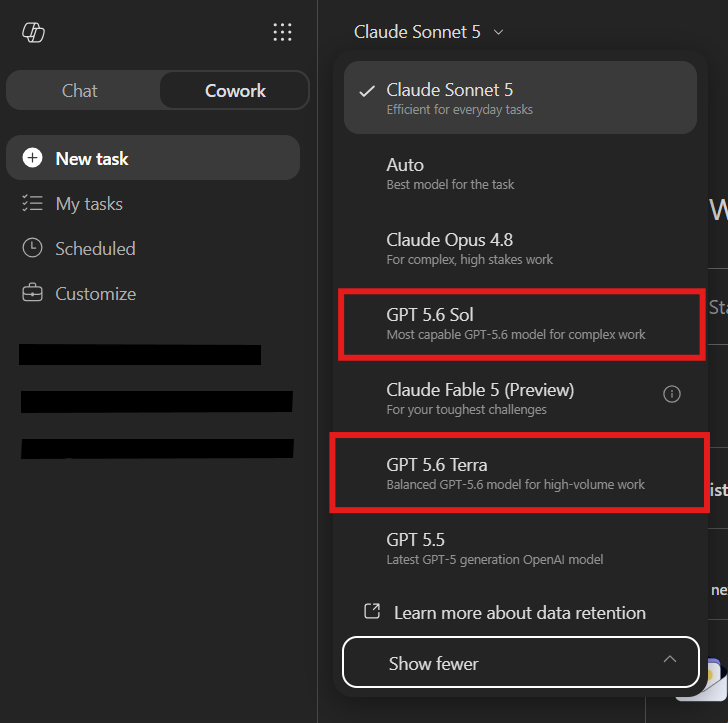
That is the before-and-after test.
If GPT-5.6 is missing, check the provider setting before you spend time troubleshooting the user, the browser, or Cowork itself.
The governance detail admins should not skip
Enabling this setting is not just a feature toggle. It is a data-processing decision.
Microsoft says OpenAI operates these models as a Microsoft subprocessor under contractual safeguards and appropriate technical and organizational measures. Microsoft Product Terms, the Microsoft Data Protection Addendum, and Enterprise Data Protection apply, subject to Microsoft’s documented exclusions.
There are also two details worth reviewing with your governance team:
- OpenAI-operated models are currently excluded from in-country processing commitments where those commitments apply.
- They are not currently available in GCC, GCC High, DoD, or sovereign clouds.
Do not turn this on just because the new model names look interesting. Decide who needs access, document the data-processing change, and start with a controlled group.
One rollout date to pay attention to
Microsoft says OpenAI-operated models are currently disabled for customers. Starting July 24, 2026, they will be enabled for all users in eligible commercial tenants unless an admin explicitly selects No users.
That makes this a setting every Microsoft 365 Copilot admin should review, even if the organization is not ready to use GPT-5.6 yet.
The question is no longer just, “How do I turn GPT-5.6 on?”
It is also, “Who should get it, and what should our policy be before the default changes?”
The practical rollout pattern
- Confirm the Global Administrator or AI Administrator who owns the setting.
- Review the OpenAI subprocessor terms and data-processing notes.
- Create a security group for the first Cowork users.
- Enable OpenAI for that group.
- Confirm GPT 5.6 Sol and Terra appear in the Cowork model picker.
- Test real work with a small group before expanding access.
- Review the setting again before the July 24 default change.
The technical step takes a minute.
The admin decision behind it deserves more attention.
If GPT-5.6 is missing in Copilot Cowork, start with the OpenAI subprocessor setting.
 Flow Alt Delete - Josh Cook [Microsoft MVP]