
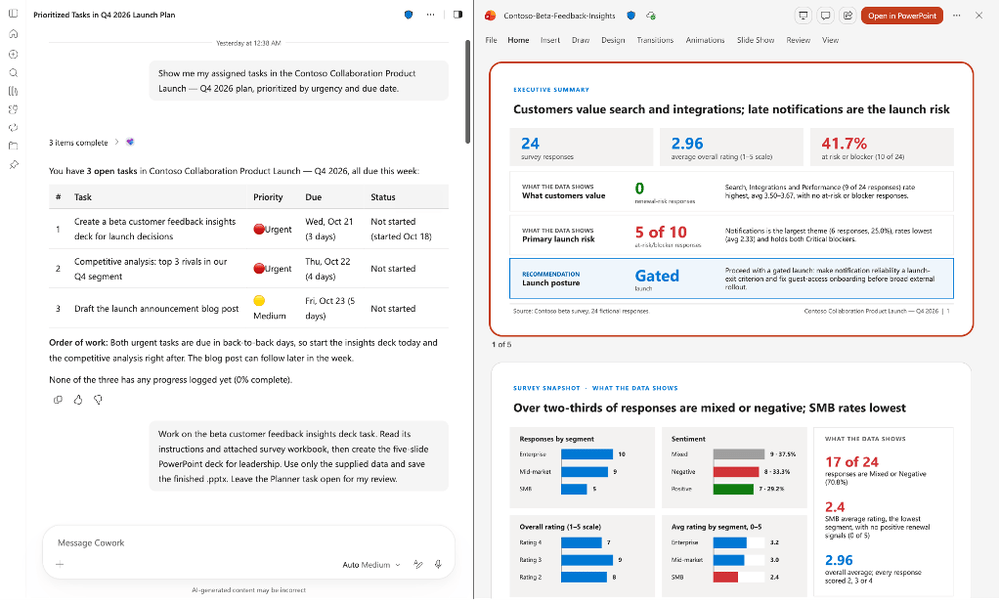
Planner is the update I want to try first. Give Cowork the task notes, checklist and attachments, and it can prepare the actual deliverable.
There is plenty more to catch up on in this week’s Microsoft AI updates. Copilot Studio has an MCP authoring server to investigate, November brings several different Copilot rollouts, and OpenAI has released Images 2.6. GitHub is also making it easier to maintain agent instructions and see which model routes people are using.
I’ve pulled the useful changes together here, including the release labels and limitations that are easy to miss. Last week’s PPCC and GitHub Universe recap covers the bigger conference announcements.
November 6, 2026 edition. Source review updated November 6. Product screenshots below are credited official examples; availability in an individual tenant can differ.
Microsoft AI updates: this week in 60 seconds
- Cowork and Planner: a November rollout connects tasks to research, drafts and files. Completing a deliverable still needs a separate decision to complete the task.
- Copilot rollout catch-up: October’s Office-in-Copilot announcement brings files alongside the conversation, and Notebooks is now Workspaces. Projects organize personal work; Chat skills and Autopilot have separate November rollout plans.
- Copilot Studio: its latest roundup highlights an MCP authoring server, workflow improvements and more visibility into credit consumption.
- Claude in Copilot: Microsoft targets EU Data Boundary processing by the end of 2026. That is a future commitment.
- Images 2.6: improved editing, new API model variants and a GIF rollout make this a useful release for creators.
- GitHub: Dependabot can propose agent-package version updates, while usage reports distinguish BYOK and enterprise custom models.
- Power Pages: preview support brings traditional Liquid and web-template sites into the AI coding plugin, so the workflow is no longer limited to SPAs.
- Power Platform: check AI Builder credit contract dates and the differences between SharePoint forms and flow-generated documents.
1. Cowork can pick up work from Planner
The Planner plugin is moving into its November rollout. It connects Cowork to the plans and tasks you can already access, including task notes, checklists and attachments. You need a Microsoft 365 Copilot license, Cowork enabled, and your organization to allow the plugin. Planner FAQ · Rollout tracker 567315.
A task such as “prepare the project update” can supply the context for a document, presentation or spreadsheet. Cowork saves the output for review and can attach its link to the Planner task after approval. It can also propose a plan from a spreadsheet, including tasks, owners and dates.
Finishing the file does not automatically complete the task. Microsoft’s FAQ says Cowork marks it complete only after approval. That is a detail I like: the person reviewing the work still decides whether the task is done.
Start with one well-described task and its source files. Check the resulting file, the link added to Planner and the task’s final status. Those three things should agree.
2. Office apps in Copilot and the move to Workspaces
Office in Copilot is an October announcement worth catching up on. Word, Excel and PowerPoint files can be created, edited and worked on with teammates inside Chat or Cowork. Microsoft introduced Office in Copilot to Frontier customers on October 9. Office in Copilot announcement.
On my screen, opening a file now puts it on the right beside the conversation. The discussion and the file stay together as the work develops.
Microsoft’s example shows a Word document opening alongside chat, where you can request another revision or edit the document directly. Library also lets you reopen existing Office files and keep working on them beside Copilot. That is the useful part for me: moving from the conversation into the actual document within the same experience.
Copilot Notebooks is now Copilot Workspaces. The name change began rolling out in phases in late October. Existing notebook content and sharing carry over; a private notebook stays private. Projects group your own ongoing work, while Workspaces provides shared context for a team. Microsoft’s rename FAQ · Cowork Projects.

| Place | What I would use it for |
|---|---|
| Projects | Keep my chats, tasks, files and outputs together for an ongoing piece of work. |
| Workspaces | Keep the source material and shared context for work involving a team. |
Office-file editing inside Workspaces has its own rollout timeline. Microsoft’s October 30 roundup lists it in Frontier during October, with worldwide rollout planned for January 2027. That date applies to editing within Workspaces; the Notebooks rename and the Office experience in Chat and Cowork have their own rollout schedules. October rollout recap.

3. Skills in Chat and Autopilot are on November’s rollout list
Microsoft’s October recap also points to skills in Copilot Chat rolling out in November, and Autopilot entering Frontier in November. Skills provide reusable instructions; Autopilot is a separate experience with a separate release label. Cowork’s OneNote and Planner capabilities are described as moving from October Frontier toward worldwide November rollout. Microsoft’s dates and feature descriptions.
Start with a weekly project update you already produce. Put the required sections, source material and final checks in the skill. You already know what a good result looks like, so you can judge whether it helps.


4. Copilot Studio has an MCP server for authoring
Microsoft’s November 4 Copilot Studio roundup highlights its MCP server for agent development. After authentication and environment selection, the server exposes supported authoring and lifecycle operations to the client. Copilot Studio MCP documentation.
There are several different uses of MCP around Copilot Studio. This server helps a coding assistant work with Studio resources. Adding an MCP server as a tool inside your agent is a different connection. Exposing an agent so another system can call it is different again.
The package is @microsoft/copilot-studio-mcp. The available operations depend on permissions, the selected environment and the connected service. The documentation predates the November roundup, so I’m treating this as a capability worth catching up on, not claiming it first launched this week.
Start in the development environment and give the coding agent one change. Review the diff, test the behavior and put it through your normal solution and release process.
5. Workflows gain more AI steps and collaboration
The November 4 Studio roundup identifies three workflow improvements as generally available: calling Copilot Chat or Cowork, extracting structured information from documents, emails and images, and allowing multiple authors. Copilot Studio roundup.
A practical example is a request arriving as a document: extract its fields, validate them, get a decision where one is needed, then write the approved values to the business system. The extraction step supplies data to a process whose rules you can still define.
The workflow documentation also explains capacity behavior. Actions consume Copilot Studio capacity. When the relevant prepaid capacity is exhausted, new runs can be blocked unless another supported capacity or pay-as-you-go arrangement covers them; in-progress runs finish. Check how your environment is configured before relying on an unattended schedule. Workflow overview and capacity.
The same roundup highlights credit visibility during building and testing, and usage for workflow runs and nodes. The Microsoft 365 admin-center cost-management experience remains preview. Seeing consumption closer to the step that caused it should make expensive retries easier to investigate.
6. Power Pages AI coding tools can now work with traditional sites
Finally. The Power Pages coding workflow is no longer limited to SPAs. The plugin can now create and edit sites built with web templates and Liquid. Microsoft announced preview support on November 6 for GitHub Copilot CLI and Claude Code. Microsoft announcement.
Ask it to add pages and navigation, update shared templates or refresh branding while keeping the site structure you already use. Download an existing site with PAC CLI, make local changes, and continue working alongside makers in design studio.
The non-SPA plugin workflows are in preview. Use Power Pages plugin version 3.0.0 or later. New sites use the enhanced data model and Bootstrap 5; downloaded sites can use either data model. A good first test is an FAQ page and its navigation link. Check it in the browser and design studio after deployment.
7. Claude in Copilot has a planned EU Data Boundary change
On November 5, Microsoft committed to bringing Claude models in Copilot, including Cowork, into the EU Data Boundary by the end of 2026 for eligible EU/EFTA organizations. Microsoft says existing users will move automatically once the change is available. Microsoft announcement.
This is planned, not available today. Current admin guidance still documents the Claude exclusion and the EU/EFTA opt-in controls. Enabling Claude now does not establish that the future processing commitment is already in effect. Current processing and admin guidance.
For organizations that paused a Cowork evaluation over processing location, this gives them a concrete change to track. It does not announce a Canadian residency change or establish the same rollout for Copilot Studio.
8. Connector reporting needs a coverage label
The Copilot Connectors usage report has a November GA roadmap target, while the current Learn page still labels it public preview. Keep that distinction visible until the documentation and tenant availability catch up. Roadmap 519571 · Report documentation.
The report shows connector activity across supported Copilot Chat, Search and agent experiences. Cowork connector usage is explicitly excluded. It also isn’t a complete report of Copilot Credit spending.
That exclusion matters if someone uses the dashboard to conclude that a connector is unused. Run a known scenario, check the reporting window and confirm that the experience is covered before interpreting a zero. Cowork has its own usage report, with a different scope.
9. Images 2.6 is worth testing on an existing asset
OpenAI released Images 2.6 on November 4 across ChatGPT, Codex and the API. The announcement emphasizes faster generation, more consistent edits, animated GIFs, API image markup and SVG exports. The API variants are GPT-Image-2.6 Flare and Sunburst. OpenAI announcement.
For my content workflow, preserving an existing design through several edits is the interesting test. Keep the face, layout and brand details, then change one thing at a time. A good first generation is useful; a version that survives the next three requests is much more useful.
OpenAI’s speed figures are vendor claims, not results from my own testing. Its release notes describe GIF creation as rolling out, so don’t assume every account already has it. ChatGPT release notes.
10. Dependabot can propose updates to agent packages
GitHub’s November 3 update adds Agent Package Manager support to Dependabot, generally available on github.com across all plans. Supported Git dependencies in apm.yml can receive version-update pull requests, and an existing apm.lock.yaml is regenerated. GitHub Enterprise Server support is planned for 3.24. GitHub announcement.
That gives teams using APM a familiar update path for shared skills, prompts and instructions. Review the proposed instruction changes, run the relevant evaluation cases and decide whether to accept the version.
This release supports version updates, not APM security updates. It does not automatically update arbitrary skills installed in Cowork or Copilot Studio, and it does not establish that an updated instruction package produces better results.
11. GitHub separates BYOK usage and adds more coding surfaces
GitHub’s November 3 usage API change distinguishes local bring-your-own-key usage from enterprise custom-model usage. Those breakdowns sit within the existing totals. Adding them to the totals would double count. Local reporting depends on client telemetry; enterprise custom-model requests are measured server-side. Usage API announcement.
This helps explain which route a request took, although it does not combine every provider’s invoice into one cost figure. Local BYOK can be undercounted when telemetry is disabled or token usage is missing, so the reporting limitations belong beside any comparison.
Two November 5 additions help interpret the numbers. Telemetry and client-version signals expose reporting gaps. Code-review metrics add an addressed rate for evaluated comments. An addressed comment can include a reply saying a fix is coming later, so that rate is not a measure of bugs fixed.
There are also two new places to use Copilot. JetBrains Air adds local and cloud tasks using a Copilot subscription. Its own analytics and spending controls do not cover Copilot usage, so check the billing and administrative path before a team rollout.
Xcode’s built-in coding assistant entered public preview on November 4, starting with Xcode 27.3 beta on macOS Tahoe 26.6 or later. GitHub lists all Copilot plans. The existing Xcode extension remains a separate integration.

12. Foundry Local brings a specific hardware requirement
Microsoft’s November 5 walkthrough connects Qwen3.8-27B running in Foundry Local to the GitHub Copilot app through BYOK. The documented setup needs Foundry Local CLI 0.13.0 or later, compatible CUDA/cuDNN runtimes, and NVIDIA hardware with at least 24 GB of VRAM. Mac and AMD expansion are future plans. Foundry Local walkthrough.
The model endpoint runs locally. The rest of the task may still involve external repositories, tools or services. Check the full workflow before calling it entirely offline.
Microsoft includes performance results from its own hardware tests. Treat those as a starting point for a comparison, not a promised result on a different machine. The GPU and runtime requirements are part of the decision.

13. Foundry’s Azure Developer CLI extension reaches GA
Microsoft’s November 5 release makes the microsoft.foundry extension bundle 1.0 generally available. Agent and deployment configuration live in azure.yaml, with local testing through Agent Inspector and a path into deployment and CI/CD. The walkthrough requires Azure Developer CLI 1.37.0 or later. Official GA announcement.
This is useful for teams that want the agent’s configuration reviewed with its code. The example needs the documented Azure access, model quota and local dependencies. Running the agent locally still calls the configured Azure model and can incur usage charges. The bundle’s GA label also does not change the status of every service it can invoke.

14. GPT-6 Cyber follows the Linux security research
OpenAI’s November 4 research reports 948 distinct exploitable Linux local privilege-escalation vulnerabilities from an automated discovery and validation pipeline. That is not a count of 948 patches already merged. Candidate fixes still go through review and disclosure. OpenAI research.
On November 5, OpenAI identified GPT-6 Cyber as the model behind that work. Initial API and Codex access is for a selected group of approved Daybreak Red customers, with expansion planned. This is restricted access, not a new model available to every ChatGPT or Codex subscriber. GPT-6 Cyber announcement.
The detail that stood out to me: in an earlier test, 20 apparently successful exploits had reached root using a different vulnerability from the one the agent was supposed to test. OpenAI added independent checks of the path actually taken.
The business-app equivalent is easy to picture. An agent produces the expected number, but reads the wrong records or bypasses the intended operation to get there. When I evaluate that kind of work, I want the result and enough execution evidence to explain it.
15. Dates and checks before next week
AI Builder credits reached their November 1 milestone. Seeded credits are no longer included with future premium licenses, and capacity add-ons reached their end-of-life milestone. Existing entitlements remain available through their applicable contract terms; this is not an automatic conversion to Copilot Credits. Microsoft tells existing add-on customers to turn off auto-renew. In Power Apps and Power Automate, available AI Builder credits are consumed first, with Copilot Credits used when required and available. If neither is available, usage can be blocked. Current transition guide.
The useful check is the actual contract end date and the capacity assigned to each environment. A working flow today does not tell you what happens when its entitlement expires.
SharePoint form visibility does not carry into Power Automate. Microsoft’s structured document-generation guidance says a flow does not apply the form’s conditional field-visibility rules. Compare the output from the form with the output from the flow before relying on the template. The documented action remains named Generate document from form (Preview), even while the roadmap lists the feature as launched. Document-generation guidance · Roadmap 561026.
GitHub Actions has two near-term test windows. The new default block for pull_request_target in public repositories is scheduled for December 2. Temporary test windows are November 9 and 16, from 16:00 to 18:00 UTC. Affected repository owners should review the notice and the applicable event policy before the first window. Private and internal repositories are outside this change. GitHub notice.
What I’d try first
Start with the Planner task. Give Cowork a clear brief and the files it needs, then inspect the deliverable and the task update. After that, try one reusable Chat skill for a report you already produce, and one bounded image edit against an existing asset.
Those are small enough to compare with how you work today. Keep the result, the failed attempts and the consumption details. That will give you something more useful to build on next week than another impressive screenshot.
Leave a Reply