October 23, 2026 edition. Updated October 22.
Copilot Code is NOW in public Frontier. Describe an app, dashboard or script, then inspect and refine what it builds. This is the headline for me this week. Microsoft announced the start of the rollout on October 21. Code rollout announcement.
I started these recaps because keeping up with all of this is becoming a job of its own. Code for building. Cowork plugins for business processes. Reusable skills in OneDrive and Brand Kits. Now Anthropic is adding Claude Duet and moving the Agent Skills standard into the Agentic AI Foundation. There is a LOT happening around the work we do every day.
There is also a Power Platform deadline you need to check. If an unmanaged Developer environment holds your demos, prototypes or learning projects, put that review on your list now.
This week in 60 seconds
- Copilot Code enters public Frontier. Build and refine apps inside Microsoft Copilot, with live preview, local code editing and optional GitHub integration.
- Cowork reaches more business processes. Role plugins and event-triggered tasks are expanding. Business apps and Power Platform Admin previews bring Dataverse and inventory into the picture too.
- Copilot Studio adds customer-facing agents. The Customer Conversation public preview combines voice, chat, specialist agents and human handoffs.
- OneDrive and PowerPoint add more skills. Reusable reporting instructions, shared Brand Kit skills and interactive slides. Availability varies by feature.
- Claude Duet joins the mix. A proactive agent that works in the background, starting with a waitlisted US Pro/Max research preview.
- Agent Skills moves to the Agentic AI Foundation. The October 22 announcement puts the standard under shared governance.
- Developer environments need attention. Creation, suspension and deletion deadlines begin November 15, December 15 and January 15 for unmanaged Developer environments.
- OpenAI reaches Google Cloud. Initial model and Codex access is a selected-customer private preview. Antigravity integration comes later.
1. Copilot Code enters public Frontier
Copilot Code gives software building its own tab alongside Chat and Cowork. Describe an app, dashboard or script, and it writes and runs the code. A live preview shows the result; code view lets you inspect the files, with direct editing documented for local projects. Overview and preview and code view.
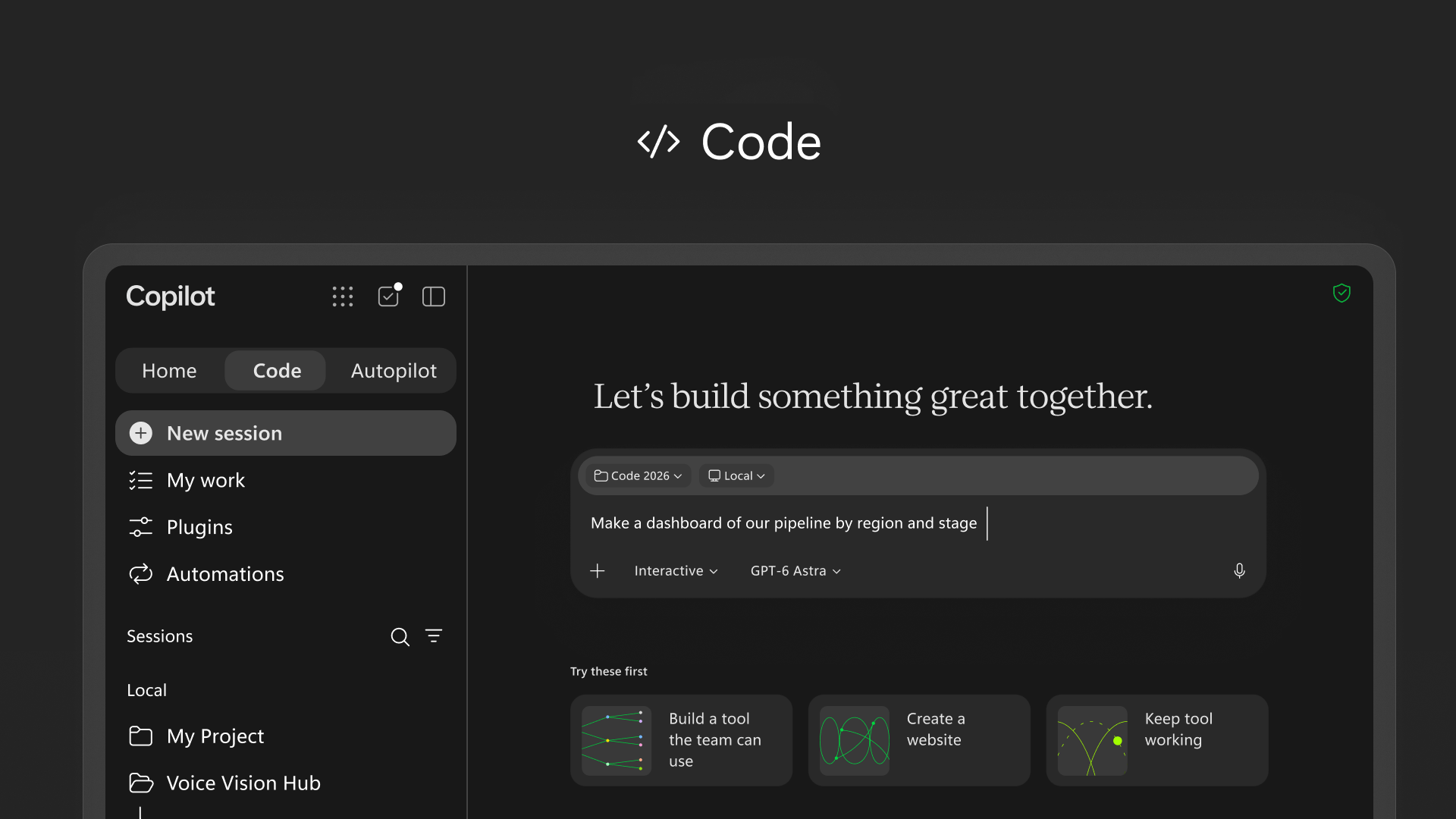
Code can use Microsoft 365 documents, emails, meetings and calendar information as build context, with your permission. It also supports the plugins available in Cowork. That means the build can start with the business information behind the request. Context and tools.
You can work in a local project folder through the desktop app or choose a cloud project. Local work gives Code access to the chosen files; cloud projects support working across devices and sharing with colleagues. The web experience supports cloud development. Getting started.
GitHub is optional. When your administrator enables the connection, Code can start from an existing repository and prepare branches, commits and draft pull requests. Review the changes in the repository workflow your team already uses. GitHub capabilities and requirements.
Cloud projects can share static apps through organization-scoped links. Interactive apps can be published to Copilot Managed Runtime (preview), with Microsoft hosting, Entra authentication and tenant governance. You can finish with a local project, a repository change or an app your colleagues can open. Publishing and sharing and Managed Runtime.
A project-status dashboard is an easy place to start. Feed it a sample CSV, show overdue work, filter by owner and calculate completion rates. The totals need to match the file, and the code needs to stay understandable when you ask for the next change.
Access: This remains a Frontier preview. Work accounts need the appropriate Copilot license and organization enablement. Microsoft's Windows setup currently calls for the unified Copilot app rollout and its Beta update channel. Check those prerequisites if the Code tab is missing. Requirements and Windows setup.
For enterprise access, Microsoft lists Code under usage-based billing with the Microsoft 365 Copilot add-on license (labelled Premium in its enterprise documentation). Consumption uses Copilot Credits, so check the organization's billing policy before a pilot. Copilot licensing overview and usage-based billing.
2. Cowork expands plugins, skills and business-event triggers
Microsoft's October 21 Cowork update adds more ways to connect recurring work to business systems. Sales, Service, Education and Legal plugins are available through Customize > Roles & Industry. Power Platform connectors are rolling out over the coming weeks. October 21 Cowork update.

Connected business events can start a task, such as a new case or a changed opportunity stage. Cowork presents the trigger, task and permissions for approval. Subsequent sends or record changes still wait for user approval. Supported events depend on the integration, and admins control which plugins and connectors users can access.
Think about a new case triggering a customer brief, or a changed opportunity stage triggering the next-step proposal. The event starts the work; the skill tells Cowork how the work should be done.
Education for Cowork is one example. Its October 20 announcement brings ten skills for work such as accreditation evidence, governance reviews and research briefs. The skills-only plugin is rolling out worldwide. It adds no education-specific license requirement, but Microsoft 365 Copilot, Cowork access through a spending policy and Copilot Credit consumption still apply. Education announcement.

Business apps and Power Platform administration
Business apps (preview) and Power Platform Admin (Preview) are both visible in my Cowork catalogue.
Business apps (preview) connects Cowork to Dynamics 365 and Power Apps. It can discover accessible environments, find Dataverse tables, including custom tables, and explore their relationships. Microsoft also documents business actions such as creating a follow-up task or changing account ownership. Existing permissions and administrator setup determine what is available to the user. Business Applications in Work IQ for Cowork.

For customer follow-up, the useful part is the connection to the actual business record. Find the account or opportunity, understand the context, and help with the next permitted action.
Power Platform Admin (Preview) is the one to look at for inventory questions. Its inventory skill covers environments, apps, flows, Copilot Studio agents, connectors, relationships and owners. The same plugin includes usage, governance and capacity skills, plus a general Advisor skill. Microsoft's Cowork catalogue lists the plugin, and the Power Platform for Admins V2 reference documents its preview Advisor MCP operation.

This preview provides insights and guidance. It does not independently execute administrative actions. Start with the questions every admin needs answered: which environments exist, who owns the apps, and which resources need attention? That is especially relevant with the Developer environment deadline approaching.
3. Copilot Studio adds a Customer Conversation harness
Copilot Studio is adding a Customer Conversation harness for customer-facing voice and chat. A primary agent coordinates specialist agents, reusable skills, tools and escalation, combining generative skills with deterministic topics. Microsoft announced it on October 21, with many capabilities in public preview and more rolling out over the coming weeks. October 21 announcement.
An order enquiry can need delivery information, a billing check and a person to resolve an exception. Those handoffs need to carry the conversation's context all the way through.
Voice and chat have different limits. Speech channels do not support end-user sign-in, so knowledge that requires those credentials is limited to chat. Per-agent model choice is planned for GA, and direct escalation into Teams chats is coming soon. Overview and knowledge restrictions.
4. OneDrive is getting personal skills
At its October 20 OneDrive event, Microsoft showed Copilot analyzing multiple spreadsheets, organizing project files and producing interactive HTML reports. Repeated processes can be saved as personal Markdown skills. Microsoft's event recap.
The editing experience is part of the story too: HTML gets live preview and comments, while Markdown gets rich-text editing and coauthoring.
A monthly report should not need a fresh explanation every month. Save which files to use, what to compare, what needs a source and what should be flagged for review. Then apply those instructions to the next reporting period.
Availability: Copilot in OneDrive and SharePoint is generally available. The event also includes features rolling out over the coming months, with no separate completion date for every new skill or editing feature. Hero Links are rolling out and let permissions change without changing the URL. Sync CLI is in private preview. Agent mentions in file collaboration remain on the roadmap. Availability and roadmap details.
5. PowerPoint gets shared instructions and interactive slides
Brand Kit skills give the team one place for its presentation instructions.
Microsoft documents creating a skill in the kit or importing a Markdown or ZIP file. People with shared access can select that Brand Kit in PowerPoint and choose its skills. Brand Skill documentation.

Put the team's presentation playbook here. How we turn a case study into a customer story. How we adapt a technical deck for executives. What we check before a presentation goes out.
Skills added directly in PowerPoint are documented as personal skills stored in your OneDrive. The Brand Kit gives those reusable instructions a shared home alongside the brand assets. Personal skill documentation.
For organization-wide kits, the Enterprise Brand Manager policy controls who can publish. Membership in its configured security group grants access; owning the group alone does not. A separate creation policy can also apply. Current governance guidance.
Microsoft announced Brand Kit skills in September. Announcement record.
PowerPoint has another skill worth opening: Create interactive slide. Microsoft's October 19 update is rolling out clickable dashboards, timelines and comparisons across Windows, Mac and web, with completion expected by the end of October. Start from a workbook or document, then refine the result through Copilot. Interactive slides announcement.
The detail to know before presenting: you edit these slides through prompts. In Teams PowerPoint Live, each person explores their own view. PDF exports stay static. How interactive slides work.
6. The Power Platform deadline to check now
Microsoft updated its Developer environment guidance on October 16.
Microsoft is deprecating unmanaged Developer environments, including those provisioned through the free Power Apps Developer Plan. Its published timeline is:
| Date | Change |
|---|---|
| November 15, 2026 | New unmanaged Developer environment creation ends. |
| December 15, 2026 | Suspension of existing unmanaged Developer environments starts. |
| January 15, 2027 | Deletion of suspended unmanaged Developer environments starts. |
The Developer environment type remains. Existing Developer environments with Managed Environments enabled are excluded, including those created through environment routing. The free Developer Plan does not supply Managed Environments use rights; qualifying premium licensing is required to run apps and flows there. Developer Plan guidance.
Start with the inventory in Power Platform admin center: Manage > Environments, then filter Type = Developer and Managed = No. Identify what you need to keep and plan the conversion or migration before suspension starts.
Managed Environments is an environment governance feature. It does not turn your unmanaged development solution into a managed solution. Keep developing in unmanaged source while you address the environment requirement.
7. Work IQ can retrieve the evidence for your agent
Microsoft's October 20 Work IQ announcement introduces a retrieve tool in public preview. It returns Markdown with citations and structured source metadata, giving another agent material to work with. Launch announcement.
Builders can inspect, rank or evaluate the retrieved evidence before generating an answer. Retrieval uses the signed-in user's delegated access, with tenant enablement, permissions and a Work IQ API spending policy required. Technical documentation.
Microsoft's launch blog and technical page currently disagree on source coverage and the default search strategy. The technical page says grounding is the default and lists Dataverse and Power BI on the roadmap. Use the current technical reference and the tools exposed by the service to plan a build. Work IQ capabilities vary by surface.
Moving from the existing Retrieval API also changes authentication, request and response handling, and billing setup. It is more than swapping a URL. Migration guide.
8. Azure DevOps joins Microsoft Copilot
The October 20 Azure DevOps plugin announcement brings projects and work items into Copilot Chat, Cowork and Code. Its built-in skills cover triage and converting requirements into backlogs with epics, features, stories and acceptance criteria. Microsoft shows documents and meeting notes feeding that work. Azure DevOps announcement.

A requirements document already contains much of what someone is about to copy into a backlog. Having Copilot turn it into epics, stories and acceptance criteria is a useful starting point. Review the dependencies and acceptance criteria before that backlog becomes the team's plan.
Setup starts in Cowork > Customize, followed by connecting an Azure DevOps organization. Access follows the user's permissions and the tenant's configuration.
9. Foundry adds browser automation, with a workflow deadline to track
Microsoft announced Browser Automation Tool general availability on October 19. It gives Foundry agents managed browser sessions through Playwright Workspaces, with support for navigation, inspection, forms and multistep tasks. The workspace is a separately provisioned Azure resource. GA announcement.
Live View and Take control are the practical features here. You can watch the browser session and step in when the page needs human input.
Private website browsing remains in public preview. Region, networking, identity and workspace requirements also apply. Browser automation documentation.
The October 20 Logic Apps article also highlights an existing deadline: Foundry's visual workflow designer and in-portal execution retire December 1, 2026. YAML definitions can continue as Hosted Agents. Microsoft's migration options include Agent Framework, Logic Apps and A2A; export the definitions before the designer retires. Migration guidance.
The Logic Apps integration remains preview. Existing Prompt Agents can be selected; selecting an existing Hosted Agent is still roadmap. Current Hosted Agent invocation covers agents created through the Logic Apps Automation app. October 20 orchestration article and integration documentation.
10. GitHub and Microsoft add more controls for agents
GitHub's October 20 package firewall public preview puts policies in front of package downloads from configured developer machines, agents and CI runners. It currently covers npm for GitHub Enterprise Cloud. The preview is free; GitHub says GA will be metered. Package firewall announcement.
The protection only applies to endpoints configured to route through it. Endpoint setup.
October 19 also brought the Copilot model-policy API to GA. Model access can be read and updated programmatically, while enterprise-team-based access remains an opt-in preview. API announcement and policy documentation.
The previously announced October 19 model retirements have now taken effect across most Copilot experiences. Check saved model choices and whether replacement models are enabled. This is a separate set of retirements from the November 16 notice in last week's recap. Effective retirement notice.
The October 21 CLI update adds opt-in, expiring OAuth credentials with automatic refresh in gh 2.103.0 and later. It is public preview. Scripts that copy a token and reuse it later need attention; that copied value will not refresh itself. October 21 CLI update.
Microsoft also outlined an expansion of Project Perception on October 19: Guardian Agents, permissions scoped to a task, and access controls that respond as an agent's risk changes. The part I like is separating the agent's authority from the employee's access. An agent handling an expense report should only get the permissions that task needs. The announcement does not give a complete availability schedule for every control. Microsoft's agent security announcement.
11. Claude Duet, portable skills and the wider AI updates
Claude Duet is the other big product announcement this week. Launched October 21, it carries over your Claude memory, skills and connected apps, then works in its own virtual machine and browser while your devices are off. It checks connected accounts every few hours and brings work back when it needs your attention. Claude Duet announcement.
Access starts with a waitlisted research preview for Pro and Max users in the US. Background checks and tasks share the plan's usage limits. Sends, payments, signatures and deletions wait for approval. The appeal is an agent that brings the next task to you. Its judgment about what deserves your attention will be a big part of whether it earns a place in the day.
Agent Skills moved to the Agentic AI Foundation on October 22. Anthropic donated the standard to the foundation under the Linux Foundation, putting its maintenance under shared governance. This fits the skills story running through this week's updates: the instructions for doing good work are becoming an asset you can reuse across tools. Portability still depends on the host, connected tools and permissions. Agent Skills announcement.
Claude Security also received an October 21 update with continuous scanning, fix tracking and API/MCP integration. It remains a public beta for Claude Enterprise customers. Claude Security update.
OpenAI and Google Cloud announced model and Codex access on October 21. Google names GPT-6 Astra, GPT-6.1 Sol and GPT-6 Luna in Model Garden, with local Codex workflows able to use Google Cloud for inference. Initial access is private preview for selected enterprise customers. OpenAI announcement and Google Cloud availability details.
The draw is access to OpenAI models through an existing Google Cloud relationship. Gemini for business and Antigravity integration come later, along with the announced Zero Data Retention and Confidential Compute options.
Claude Opus 5.5 and Sonnet 5.5 arrived in Google's Antigravity on October 20 for Google Cloud customers, subject to administrator enablement. Claude in Antigravity.
Google's own business tools are moving too. Its October 20 Gemini announcement adds a small-business entry point, marketing and finance skills, remembered brand style and connected apps, beginning a global rollout. The October 19 Gemini Notebook update lets people review slide outlines and video producer notes before rendering. Business update and Notebook review step.
One useful ChatGPT update from October 20: locked chats are gradually rolling out, hiding selected conversations from normal history and search behind a PIN or device authentication. This does not change retention or training settings, and existing shared links remain accessible unless separately removed. Codex and local Work conversations are excluded. October 20 release notes and locked-chat guide.
12. Researcher modes and agent surfaces are changing
The October 19 Researcher notice says the Critique and Council preview modes will retire from late October through mid-November. Researcher and Analyst remain available. The dates come from the public copy of Microsoft's Message Center notice.
Those modes offered two ways to bring a second model into research: critique a report or compare parallel reports. Microsoft's mode documentation. If they are part of a team's research instructions, update the instructions as the rollout reaches that team.

Two October 16 notices also affect agent workflows:
- SharePoint
.agentfiles: new creation moves to Agent Builder from mid-November. Existing files stop responding after March 2027, with no automatic upgrade. Review the destination, sharing and Teams setup. Official upgrade guidance. - Copilot Studio's maker app in Teams: editing ends in January 2027 and the app is removed in February, according to the public copy of Microsoft's notice. Published agents can still be used in Teams; the change concerns the maker surface. Teams channel documentation.
Where I would start
Copilot Code is the feature I would put first this week. Start with a small app or dashboard, inspect the result, and make the next change.
Then check your Developer environments. That deadline is close enough to act on now.
The direction is clear: build the tool, connect it to business context, and give it instructions it can use again. Microsoft is putting more of that work inside Copilot.
Last week's AI Weekly: agent accounts, legal skills and Copilot's app reset.
Leave a Reply