Week of October 5–9, 2026 · Updated October 9
My Copilot Chat picker is finally showing the model versions. GPT-6.1 Sol is appearing in the picker. And there is an Advanced reasoning (Experimental) option that, in my testing, feels like a mini Cowork inside Chat.
The week has grown considerably since that first look. Dynamics 365 is bringing more work into Cowork and Teams. PowerPoint can turn a recorded task into a reusable Skill. Windows is preparing for more AI work to run on the PC itself. Here’s what’s available, what’s still in preview, and what’s worth testing.
This week in 60 seconds
- Copilot Chat: Named model versions, GPT-6.1 Sol and Advanced Reasoning are showing up in my work Chat picker. Availability varies by tenant.
- Dynamics 365: Thirty CRM skills are GA in Cowork; CRM in Teams is in public preview.
- Reusable work: PowerPoint documents Record a Skill. Copilot Studio’s new monthly roundup separates available capabilities from previews.
- Windows: MXC is GA. Copilot hybrid intelligence and local/cloud HydraFusion routing have later rollout windows.
- GitHub: Local sandboxing, Ollama discovery, Haiku 5.5 and a new secret-detection model all feature in October 7 announcements.
- Admins: Targeted Release retires in January. Review assignments before November’s enrollment freeze, plus the October 20 connector-policy deadline.
- Foundry: Microsoft-Decision-1 launches October 9 for fast decision scoring, including routing and classification.
- Beyond Microsoft: ChatGPT adds Intelligent UI; OpenAI and Atlassian expand their enterprise partnership.
Copilot Chat is showing which model you are choosing
If I’m choosing Sonnet or Opus, I want to know WHICH version. The same goes for GPT.
In the picker screenshot I shared on October 6, the Claude choices include Sonnet 5, Sonnet 5.5 and Opus 5.5. The GPT side shows GPT-5.6 Sol with Quick response and Think deeper options, GPT-6 Sol, and GPT-6.1 Sol. These are observations from the work Copilot Chat experience. Your tenant may show a different list.

The practical benefit is simple: a model comparison becomes much more useful when you can record the actual version. Keep the prompt, sources and expected result consistent, then compare the work you receive. “I used Claude” leaves too much out.
Microsoft’s October 6 release notes also document a useful Web change: the response menu can offer Try Again or Switch Model, so you can request another answer without retyping the prompt. That release-note batch covers September 22 through October 6; it does not mean every listed feature first shipped on October 6.
GPT-6.1 Sol is arriving in Copilot Chat
This is a rollout follow-up to Microsoft’s September 30 announcement. Microsoft introduced GPT-6.1 Sol and Claude Sonnet 5.5, starting with Cowork and Copilot Studio and bringing them into Word, Excel, PowerPoint and Chat in phases over the following week.
The new development for this edition is seeing GPT-6.1 Sol inside the Chat picker. Microsoft says access in these subscription experiences is subject to limits, and availability can vary with license, access and region. Its licensing guidance includes model selection within the user subscription license. Keep that separate from usage-billed Cowork work.
My suggested test: give two available models the same document, ask each for a decision brief, and score whether they identify the same constraints and support their recommendations. A newer name is a reason to test. The finished result is what earns a place in the workflow.
Advanced Reasoning feels like a mini Cowork inside Chat
This is the option I’m most interested in. The picker calls it Advanced reasoning (Experimental), with the description “Performs complex tasks.” I’ve been testing it, and my first impression is very good. As I said in my October 6 post, it feels like a mini Cowork inside Copilot Chat. I’m also seeing it in regular Frontier-enabled tenants.
That is a description of my experience. The public Microsoft sources I checked do not explain exactly which model powers this experimental option, its complete eligibility rules, or its billing treatment. I’m not assigning it to GPT-6.1 Sol, Opus or another backend based on the name alone.
The next useful comparison is a real task with several steps: interpret a brief, work through the evidence, produce a usable file, and handle a correction. Record the output, elapsed time and how much steering it needs. That will tell us more than asking the model to identify itself.
PowerPoint can turn a recorded task into a reusable Skill
This is one I want to put through a real presentation task. Microsoft’s Record a Skill documentation describes capturing slide edits, ribbon actions and Copilot interactions, then generating instructions you can review and change. The saved Skill lives in your personal Skills folder in OneDrive and can be selected from the picker or invoked with an @mention.
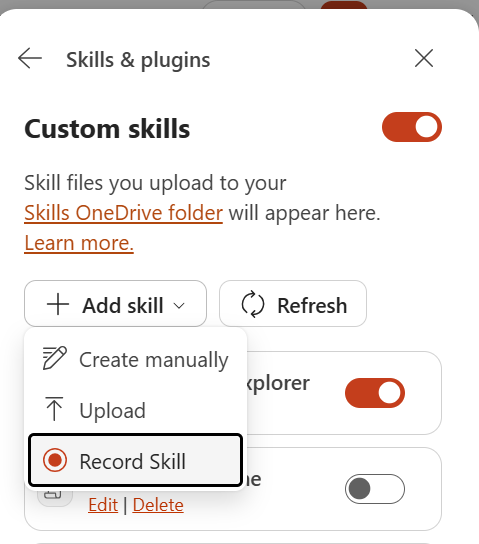
Recordings must stay under ten minutes. Voice narration and actions in another app or window are not captured, and an unfinished Copilot action might be missed when recording stops. I haven’t tested this yet. I’d start with a recurring slide-formatting job, then try the saved Skill on a different deck to see how well it repeats the edits.
Windows is becoming a place for agents to work
The October 7 Windows announcement puts local AI and agent execution at the center of the PC story. Microsoft Execution Containers (MXC) is generally available on Windows 11, with runtime policies governing agent access to files and networks. Device and update requirements still apply.
Copilot’s next step is upcoming: with permission, Home, Code and Autopilot will gain PC context, local actions and local-model support. Microsoft expects these hybrid-intelligence capabilities to begin arriving on Copilot+ PCs over the coming months. That is a different availability milestone from MXC’s GA.
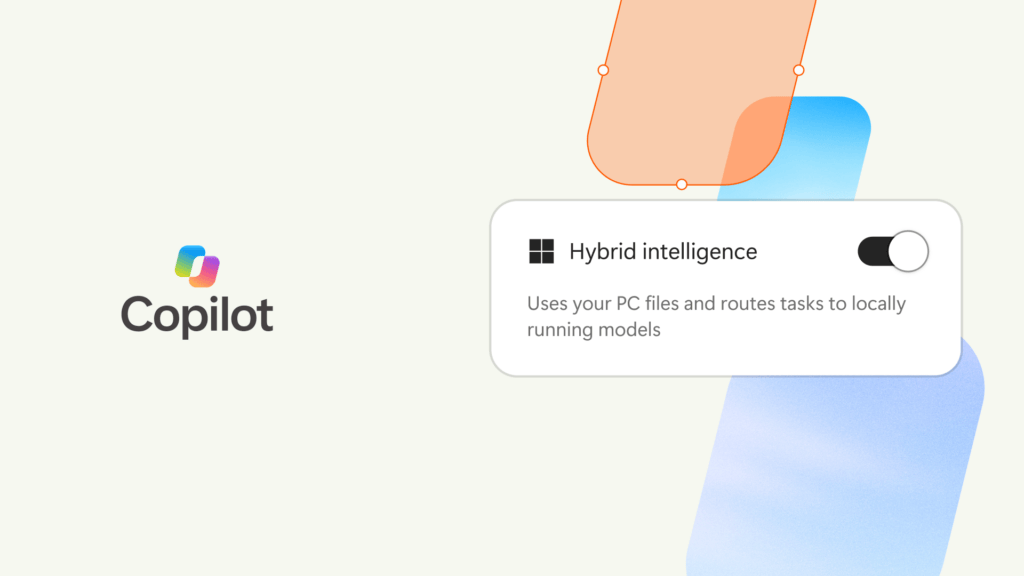
For coding, Microsoft’s technical deep dive describes HydraFusion coordinating local and cloud inference. The Windows announcement targets an experimental preview later in October across the GitHub Copilot app, CLI and VS Code. The practical test will be a complete coding task: successful changes, elapsed time and cloud usage, with the same execution permissions in each run.
The hardware arrives first. Surface Laptop Ultra opened for preorder October 7, with availability beginning October 16. For an AI workflow, the useful question is whether the whole task fits and performs well while the rest of your applications remain open. Microsoft’s memory discussion includes model weights, context cache, the runtime and ordinary PC workloads in that budget.
Admin changes: release rings, connector actions and spending
Targeted Release retires in January 2027
Microsoft’s October 7 retirement guidance says Targeted Release enrollment changes stop in November 2026, ahead of retirement in January 2027. Review your existing assignments before November.
Frontier handles eligible previews. Standard and Deferred determine GA timing, with Deferred adding approximately 30 days for eligible major features. Frontier can coexist with either GA preference; preview enrollment does not replace the GA setting. Microsoft 365 Apps update channels and Windows update channels are outside this retirement.
I’d map the current validation group to the new preferences before the freeze. Keep the people testing previews identifiable, and make the broader organization’s GA timing an intentional choice.
Federated connectors: actions are rolling out, and an older deadline is approaching
Microsoft’s current connector guidance says support for write, update and delete tools begins rolling out in early October. It still labels that section Coming soon, so treat this as rollout guidance. Availability depends on the connector’s tools and the Copilot experience; Researcher remains read-only.
Actions use the connected user’s permissions. Approval is initially required, with choices that can allow that individual tool for the conversation or persistently. For Cowork projects, inspect the actual write tools and approval settings before promising an end-to-end process.
Carryover deadline: Organizations that previously disabled federated connectors with Set-FederatedConnectorToggle must reapply that choice through Allowed agent types by October 20 to preserve it. This comes from existing August guidance, surfaced again in this week’s briefing.
Check access and spending before rollout
Microsoft’s updated discovery guidance says the old setting for hiding usage-billed AI experiences is being deprecated and replaced by request-access controls. Its Cowork administration documentation keeps the key boundary clear: a spending policy determines access. Seeing an entry point does not, by itself, mean a user can run metered work.
For admins, I’d check the user’s path from discovering an experience to getting approved, then verify the policy and limit covering that user. Check this before inviting people to try it.
Carryover worth planning for: An October 1 Partner Center announcement says new Microsoft 365 Copilot Business subscriptions purchased through CSP will have usage-based billing enabled by default starting December 1, 2026, in supported markets. The adjustable default limit is 4,000 Copilot Credits per user per month. Charges follow actual consumption. Those 4,000 credits are a spending limit, not an included credit allowance.
For CSP customers, this makes spending-policy setup part of onboarding. Review the default limit before enabling the broader team. Other purchase channels can have different timelines.
GitHub adds execution controls, local models and Haiku 5.5
Local sandboxing is GA, and it needs to be enabled
On October 7, GitHub made local sandboxing generally available in its Copilot app, CLI and VS Code Agent Host sessions. Policies can restrict agent-run commands’ filesystem, network and credential access. It is included with Copilot at no additional charge.
The implementation details matter: local sandboxing is off by default. It uses OS-level process restrictions rather than a separate VM, remote MCP servers sit outside that local boundary, and built-in file tools enforce the policy inside the CLI. For a Power Platform repository, test the actual build tools and required destinations before treating the policy as proven.
Ollama discovery and Haiku 5.5 expand the model choices
In Copilot CLI 1.0.94-0, /model can discover compatible models in a running Ollama instance. The runtime and model must already be installed, and the model must support streaming and tool calling. You can switch within the session. Choosing a local model does not automatically enable offline mode or disable telemetry.
Claude Haiku 5.5 also reached GA in GitHub Copilot on October 7, with gradual rollout across paid plans and supported clients. GitHub positions it for small edits, terminal tasks and high-volume agent work. Its Sonnet 5 comparison comes from GitHub’s early testing. I’d measure task completion and actual AI Credits on our own workload before making a cost claim.
Secret detection gets a specialized model
GitHub’s October 7 secret-detection update uses surrounding code to spot likely credentials without relying only on recognizable token patterns. Existing AI-detected alerts move to the model with no extra charge under Secret Protection or Advanced Security. The new push-protection checks are private preview; added checks for /security-review are coming to private preview. Those opt-in checks have a separate planned AI Credit cost.
Earlier this week: review quality and adoption data
GitHub introduced ReviewBench on October 5, a research preview benchmark for AI code review. Its evaluation set contains 219 public pull requests across 19 languages, shaped using the distribution of 103.9 million pull requests.
I like the question this forces teams to answer: did the reviewer catch an important defect, and how many distracting comments did it add? The public dataset and evaluation materials make that discussion more repeatable. For Power Platform teams with Dataverse plugins, PCF controls or deployment code, that is a better starting point than counting how much feedback an agent generates.
A separate October 6 GitHub notice warns that some SDK-based agent activity was missing or incorrectly attributed in usage metrics. VS Code 1.139.0 and later include the fix; other IDE fixes are expected through November. Missing historical activity cannot be backfilled, and billing was unaffected.
Before concluding that an AI pilot lost momentum, check whether its IDE versions were affected. A reporting gap can change the story your adoption chart appears to tell.
Dynamics 365 brings CRM work into Cowork and Teams
Thirty Dynamics 365 skills are GA in Cowork
Microsoft’s October 8 CRM announcement adds 30 prebuilt skills across Sales, Customer Service and Customer Insights. They are GA in Cowork, with Autopilot in private preview and Code access through Frontier. Dynamics 365 MCP servers provide the underlying tools, and custom agents can reuse the skills.

Examples include finding risky deals, researching cases and proposing CRM updates for review. CRM in Teams is public preview: connect a channel to an account to bring customer briefs and case updates into the conversation. The expanded Service Agent experience is limited to selected Frontier customers in private preview.
Cost date: Sales Development Agent remains in public preview and starts consuming Copilot Credits on November 16, 2026. I’d use a pilot to measure completed outcomes and the amount of human correction required before scaling the workload.
Recurring conversation evaluations
Microsoft’s roadmap item 573267, added October 5, now marks recurring conversation evaluations as Launched, with October 2026 general availability for Dynamics 365 Contact Center and Customer Service. The record’s publication date is separate from the exact day a tenant receives the feature.
The evaluation-plan documentation describes recurring daily plans, conditions for selecting conversations, and manual, AI-assisted or AI-agent evaluation methods. The useful change is being able to make quality review an ongoing process, including previously closed conversations. Start with a small, reviewed sample before expanding the program.
Copilot Studio: stronger evaluation and readiness tools
Microsoft published its September Copilot Studio roundup on October 7. It confirms Foundry IQ integration and the Review panel are GA, while apps, Copilot Managed Runtime and GitHub-harness hooks are preview capabilities. This is a newly published roundup of updates, not evidence that every feature launched October 7.
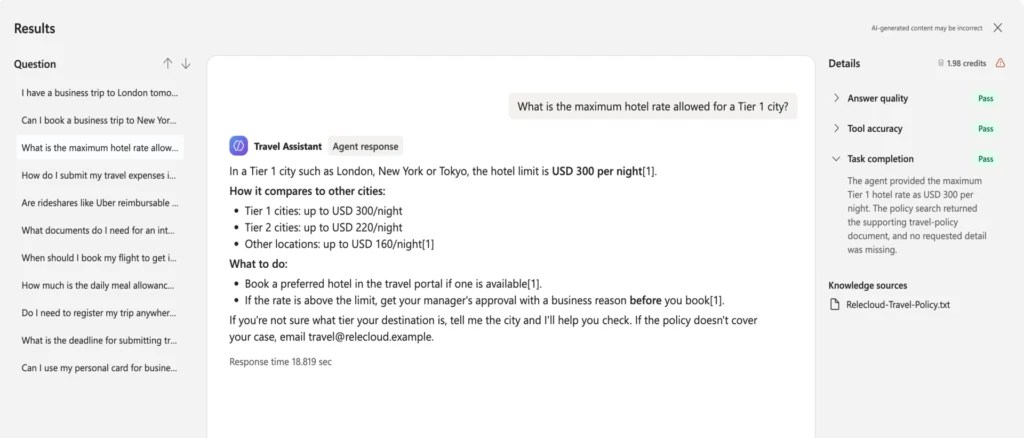
The evaluation changes are particularly useful: task completion, tool accuracy, safety and latency results; reusable custom graders; and an Evaluation Viewer role for reviewers. The Review panel can flag an agent that has never been evaluated or whose model changed after evaluation. That gives makers a concrete reason to rerun checks when changing the model picker.
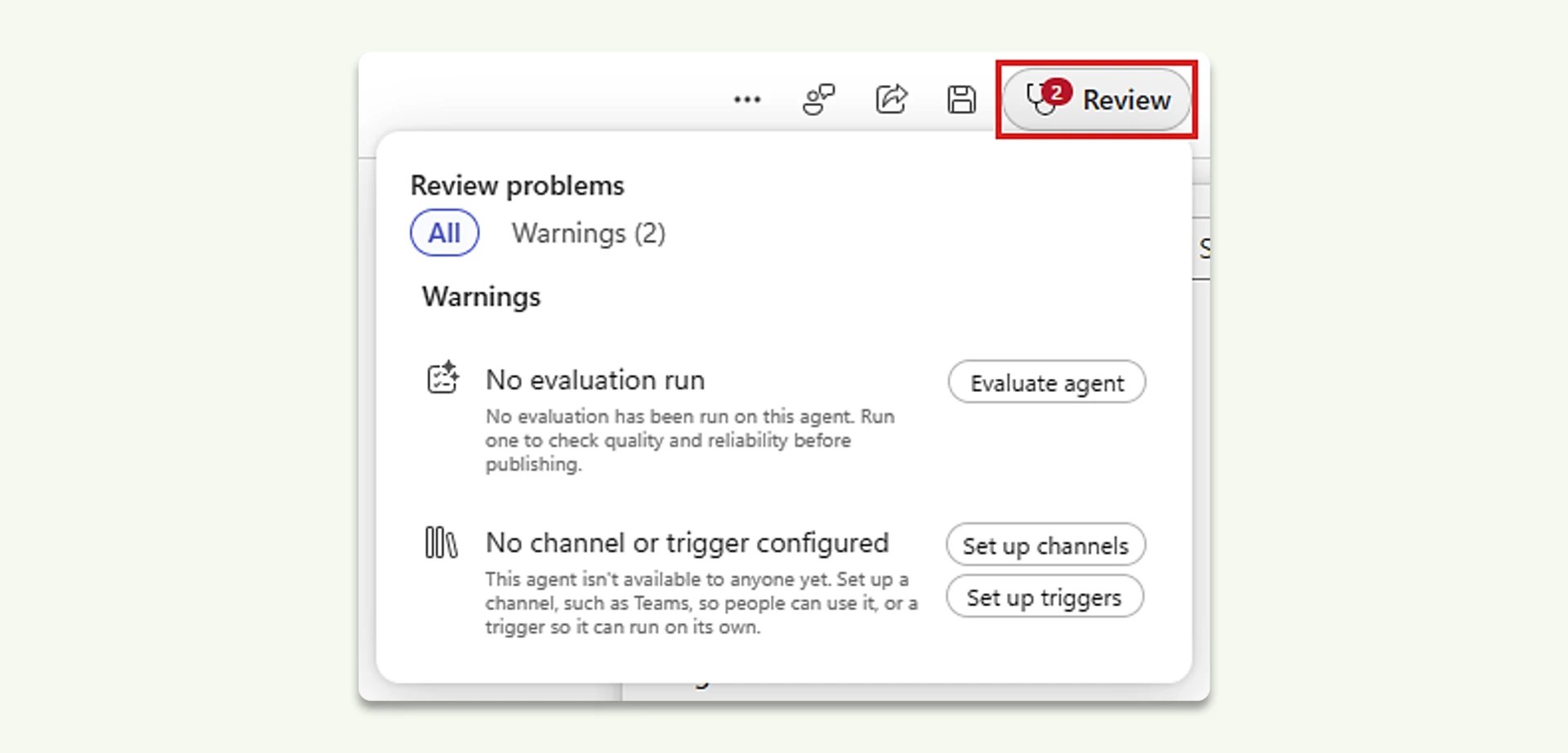
The roundup also says Copilot Studio support for the central plugin registry is rolling out over the coming weeks. Keep that timing separate from the October roadmap targets below.
October watch: self-learning and reusable Skills
Two roadmap entries deserve attention. Self-learning, item 570432, describes using completed runs to recommend improvements, including moving repeated tool sequences into workflows. Makers review the evidence, configure and test changes, and publish the refined agent. It is not a promise that an agent can silently rewrite and deploy itself.
The Skills catalog, item 571880, describes discovering and reusing approved organizational skills across Copilot Studio, Microsoft 365 Copilot and Cowork. My interest is in capturing a useful way of doing work once and making it available to more agents.
Status rechecked October 8: Both records still say In development, with October GA targets. They were added in late September. This is an October watchlist, not two newly shipped features.
Computer use in workflows is also on the roadmap, but the current standalone computer-use documentation distinguishes agent flows from workflows and says workflows are not yet supported. Check the precise authoring surface before building a demo around that target.
Microsoft-Decision-1 brings fast decision scoring to Foundry
Microsoft announced Microsoft-Decision-1 on October 9. It is available in Microsoft Foundry, with OpenRouter support coming soon. Give it a fixed set of choices and it returns a probability score for each one. Microsoft positions it for routing, classification, prioritization and workflow control.
The pricing caught my attention: $0.042 USD per million input tokens, with free output tokens. In Microsoft’s latency comparison, Decision-1 returned a decision in 85 milliseconds at the median, versus 3.01 seconds for GPT-6 Sol. That is about 35 times faster on this decision benchmark. Those are Microsoft’s measurements; I haven’t tested it yet.

I’d start with a narrow routing job: classify an incoming request, choose the right queue or model, and send low-confidence cases for review. Compare it with the current approach on accuracy, latency and cost before wiring it into the workflow. That is a useful test for a separate hands-on follow-up.
Beyond Microsoft: ChatGPT adds Intelligent UI
OpenAI’s October 7 GPT-6 announcement introduces Intelligent UI: responses can combine prose with charts, forms, interactive diagrams and small tools built for the question. Rollout began with Plus, Pro, Business and Enterprise, followed by Free and Go on October 8; workplace settings can affect Enterprise access.
This update applies to ChatGPT’s Chat experience. OpenAI says it does not change the models powering Work or Codex. For makers, the interesting question is which short-lived tasks can now get a useful interface directly in the conversation, and which still need a maintained business application.
The October 6 OpenAI–Atlassian partnership expansion brings more GPT-6-family capability into Atlassian and Rovo, while plugins connect ChatGPT and Codex to project and documentation context with appropriate permissions. Deeper Jira integrations for assigning and tracking agent work remain an area the companies are exploring.
Practical Cowork check: a remaining balance can still be unavailable
One useful item from this week’s cost-tip research: Microsoft says /cost can show an individual balance even when the shared group has exhausted its overall limit. If Cowork blocks the next task, check the group’s spending policy before assuming the model or prompt is the problem. Microsoft’s /cost guidance also makes clear that the in-product figure is an estimate, not the authoritative billing record.
It fits the bigger question behind the model picker: can the person choosing the model actually complete the work under the policy and budget assigned to them?
For the previous edition, see AI Weekly: Copilot Studio Hooks, Lovable, and Desktop Automation.
Leave a Reply