Summary
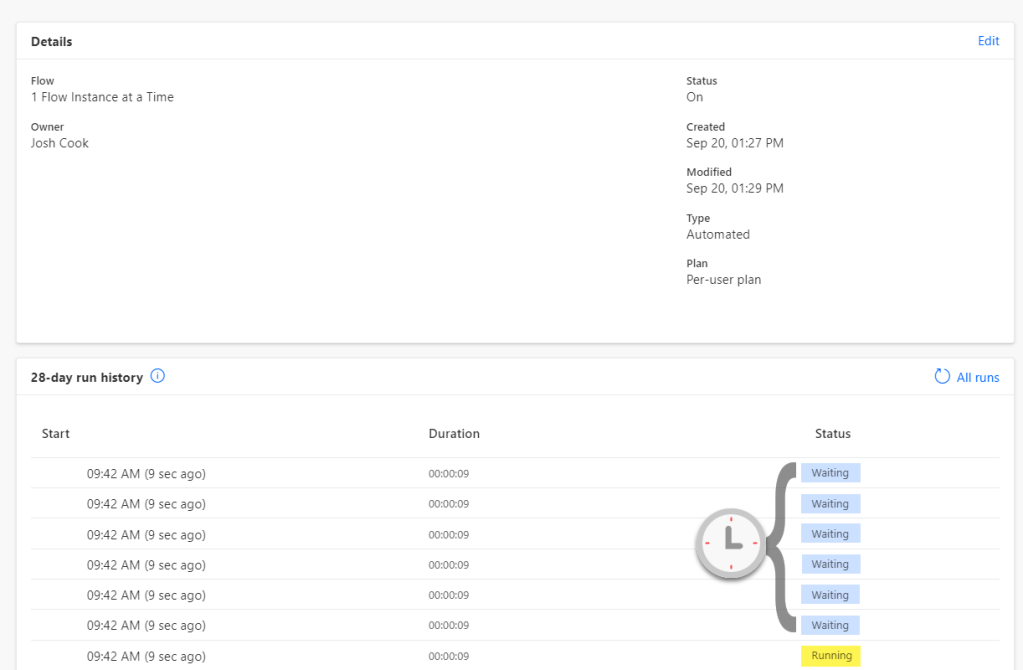
Controlling when your Flow triggers can be crucial. By default Flows run in Parallel, this means multiple runs could be running at the same time, this is great for performance, but could cause troubles in some Flows. For example:
Lets say we have a Flow setup that is triggered on when an item in a SharePoint list is created, which gets sent to other systems for different purposes. For data quality reasons, we only want the Flow to run one at a time, and have other runs be waiting in a queue.
The Flow
The only setting we need to change is in our Trigger.
This can be done on Triggers other than SharePoint
For this demo, I added a Compose action to get the Name of the item being created in SharePoint.
I added a Delay action only to show what happens if multiple runs queue up.

The setting we want to change is in the trigger, click the 3 dots on the trigger and select Settings from the drop down.

Now inside Settings, find and enable Concurrency Control, and set Degree of Parallelism to 1. This setting is how many runs can run in at one time. Click Done

My trigger is When an item is created, so I will create 3 items, one every 15 seconds to show what happens with queued runs.
1st item = Run1
2nd item = Run2
3rd item = Run3
Here are my findings:

As we can see the runs are not in order, of the way I created the items. So we can conclude that if we create the items faster than our trigger time, we can expect that the Flow will not run in a sequential order.
Conclusion
As we can see above, this Trigger setting is very useful when needing to limit the Flow to run one at a time.
But the limitation on this is, if the Flow is being triggered multiple times and having the runs queue up, there is a chance that the runs will not run in order.


 Flow Alt Delete - Josh Cook [Microsoft MVP]
Leave a comment